Why Security Matters for AI Agents
When you run AI agents, you are trusting them with sensitive data: API keys worth hundreds of dollars per month, access to your codebase, and potentially confidential business information. Most agent platforms ask you to upload your API keys to their servers. We think that is wrong.
Our Security Principles
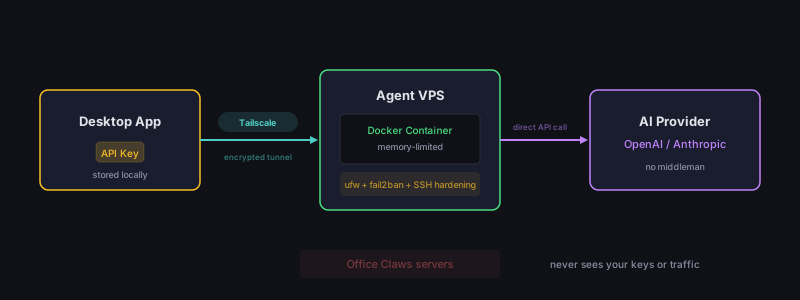
1. Keys Never Leave Your Machine
Your API keys for OpenAI, Anthropic, and other providers are stored locally on your computer. They are never transmitted to Office Claws servers, never stored in our database, and never logged.
When your agent needs to call an AI provider, the key is passed securely through an encrypted Tailscale tunnel directly from your desktop app to your agent's VPS.
2. Encrypted Networking with Tailscale
Every connection between your desktop app and your agent VPS goes through Tailscale, a WireGuard-based mesh VPN. This means:
- End-to-end encryption — Traffic cannot be intercepted, even by us
- No exposed ports — Your agent's VPS has no public-facing ports
- Zero-trust networking — Only authenticated devices can connect
3. Isolated Infrastructure
Each agent runs on its own dedicated VPS. There is no shared infrastructure between users. This provides:
- Process isolation — Your agent cannot access other users' agents
- Network isolation — Each VPS has its own Tailscale identity
- Data isolation — Nothing is shared between agent instances
4. You Own Your Infrastructure (Self-Hosted)
With the self-hosted plan, the VPS runs on your own DigitalOcean account. You have full SSH access, can audit everything running on the machine, and can destroy the droplet at any time.
What We Do NOT Have Access To
- Your AI provider API keys
- Your agent conversations
- Your agent's files or data
- Your Tailscale network traffic
- Your DigitalOcean resources (self-hosted plan)
What We DO Have Access To
- Your email address (for account management)
- Billing information (processed by our payment provider)
- Anonymous usage telemetry (can be disabled)
- Agent status metadata (online/offline, not content)
Recommendations
- Use unique API keys — Create a dedicated API key for Office Claws rather than sharing your personal key
- Rotate keys regularly — You can update your AI provider key from the agent admin panel at any time
- Review your DigitalOcean dashboard — Self-hosted users should periodically check their droplets and billing
- Keep your desktop app updated — We ship security patches in every release
Open Source Commitment
We believe security requires transparency. Our agent runtime is open source, so you can audit exactly what runs on your VPS. The desktop app source code is also available for review.
Security is not a feature — it is a foundation. Everything we build at Office Claws starts with the question: "How do we keep user data safe?"