Why an OpenClaw Sandbox Is the Default Safe Pattern
OpenClaw-style coding agents are powerful because they can run commands, edit files, install packages, and keep working in the background. That is also why every serious workflow needs a sandbox before the agent touches a real repository, a shared .env, or a production deploy path.
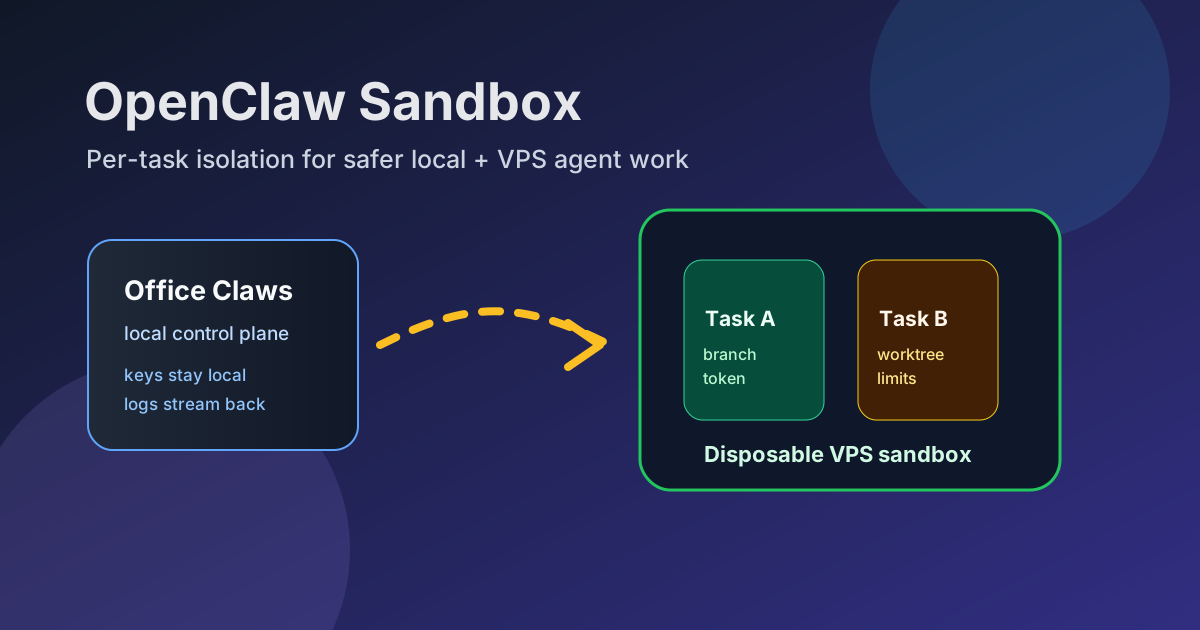
Office Claws is not a native OpenClaw runtime. The safe operating model still applies: keep the control plane local, run risky work in disposable runners, and let Codex-backed agents operate inside a bounded workspace. If you are still choosing the execution layer, start with OpenClaw vs Codex. This guide focuses on the sandbox around the agent.
What Belongs Inside the Sandbox
A useful OpenClaw sandbox is smaller than a developer laptop and stricter than a normal VPS. It should contain only the material required for one task.
| Layer | Sandbox rule | Why it matters |
|---|---|---|
| Source code | Fresh branch or worktree per task | Prevents one agent from corrupting another task |
| Secrets | Scoped token, never the operator vault | Limits blast radius after prompt injection |
| Network | Allow package registries and GitHub; review everything else | Reduces exfiltration and surprise callbacks |
| Filesystem | Writable repo, temporary cache, no home-directory sprawl | Makes cleanup reliable |
| Runtime | CPU, memory, time, and spend caps | Stops runaway commands and API loops |
| Output | PR, patch, logs, and test result | Keeps review human-readable |
That model is the practical version of OpenClaw security best practices: assume the agent is useful, assume its environment may be influenced by untrusted code, and build boundaries accordingly.
A Practical OpenClaw Sandbox Architecture
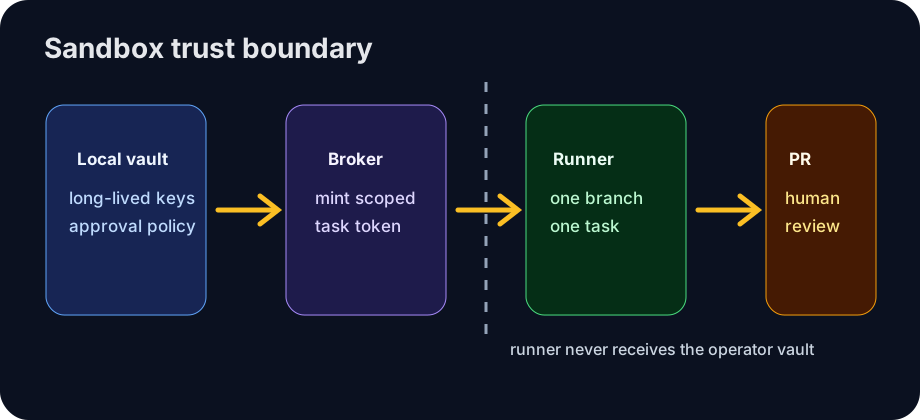
The safest setup has four parts: a local operator machine, a credential broker, a disposable runner, and a review gate.
Office Claws desktop
  ├─ stores long-lived provider and GitHub credentials locally
  ├─ approves task, branch, budget, and runner policy
  └─ streams logs and status back to the operator
        │
        ▼
credential broker
  └─ mints one short-lived repo token for one task
        │
        ▼
VPS sandbox
  ├─ fresh checkout or worktree
  ├─ Codex-backed execution for the task
  ├─ no production secrets on disk
  └─ destroy or reset after completion
        │
        ▼
PR / patch review
For remote execution details, see OpenClaw on VPS and the OpenClaw desktop manager page. Office Claws for OpenClaw users is the local-first manager in this pattern: it coordinates the runner, keeps visibility in one place, and avoids turning a random terminal pane into the control plane.
Failure Modes the Sandbox Should Contain
A sandbox is only useful if it is designed around real failures. Four matter most for autonomous coding work.
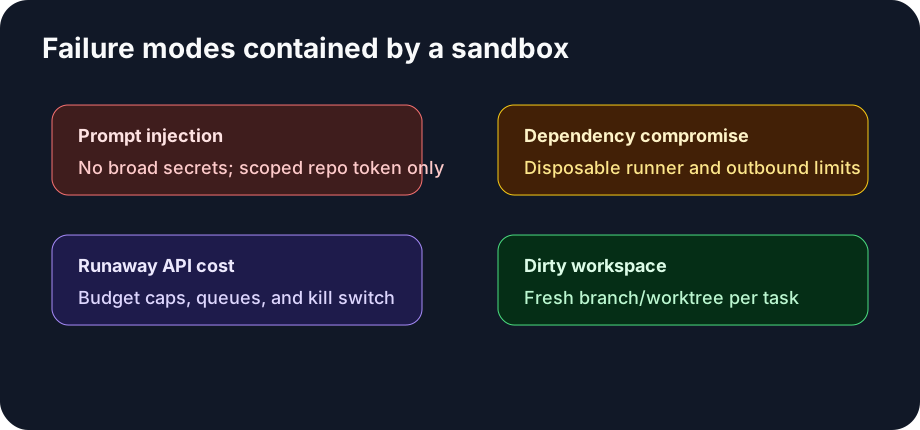
- Prompt injection from repository content. Treat issue text, README snippets, package scripts, and test fixtures as untrusted input. The agent should not receive broad secrets just because a task mentions deployment.
- Compromised dependencies. Let the runner install packages, but make it disposable. Cache dependencies carefully and reset the workspace after the job.
- Runaway costs. Put budgets on model calls, queue length, runtime, and retries. A stuck agent should fail closed, not burn an afternoon of API spend.
- Dirty workspaces. One task should mean one branch, one worktree, and one review surface. Parallel agents sharing a checkout are a debugging trap.
This is also why OpenClaw monitoring belongs next to sandboxing. Logs, status checks, and stuck-agent recovery are safety controls, not just convenience features.
Minimum Viable Sandbox Checklist
If you are not ready for a full platform, start here:
- Create a fresh worktree or VM per meaningful task.
- Use repo-scoped GitHub tokens with short expiry.
- Keep provider keys on the local operator machine or in a brokered service.
- Block production deploy credentials from agent runners.
- Run tests in the sandbox and publish the result with the patch.
- Stream logs somewhere the human can inspect without SSH spelunking.
- Delete or reset the runner after the task completes.
The goal is not to make agents powerless. The goal is to make mistakes cheap, visible, and reversible.
Where Office Claws Fits
Office Claws makes this pattern easier to operate: desktop management, VPS runner provisioning, queue visibility, log review, and safer local key handling. It is Codex-first today, so the honest pitch is not “Office Claws runs OpenClaw natively.” The honest pitch is that OpenClaw users and teams need a durable operations layer for the same class of autonomous coding workflows.
If you want the broader product framing, read Office Claws for OpenClaw users and OpenClaw vs Codex. If your next concern is credentials, continue with OpenClaw secrets management.
Recommendation
Make the sandbox the default, not the exception. Let agents explore, edit, and test inside a bounded runner. Keep long-lived credentials out. Review a branch or PR instead of a live workspace. Then scale from one safe runner to many.
That is the practical path for OpenClaw-style work: local control, remote isolation, visible logs, scoped tokens, and a review gate before anything important changes.
Related Reading
- OpenClaw vs Codex — compare runtime and operating models.
- Office Claws for OpenClaw users — desktop management for local and VPS agents.
- OpenClaw Secrets Management — keep keys local while agents work remotely.