Where the Money Actually Goes
Most people guess wrong about what an AI agent costs. They either panic at the first bill or assume it is cheaper than it is. The truth is boring: on Office Claws, you pay for two things. A droplet that runs the agent, and the tokens the agent sends to its model provider.
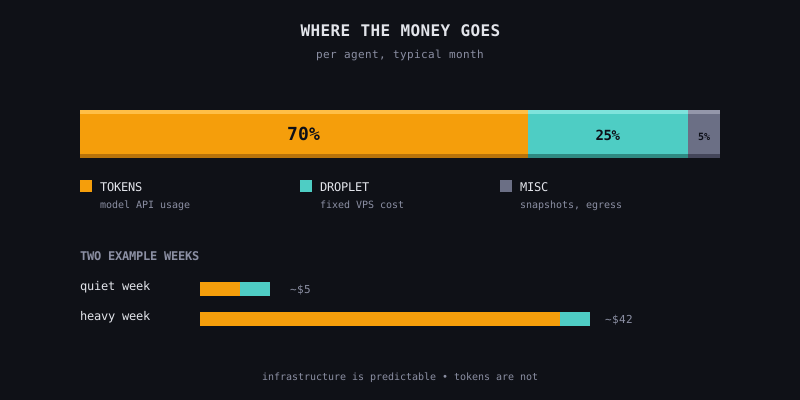
Infrastructure is the predictable part. A basic DigitalOcean droplet on the self-hosted plan is about $4/month per agent. Our managed plan rolls this into $14.99/month with support included. Either way, you can forecast it on day one.
Tokens are the part that surprises people. A quiet week is maybe a dollar or two per agent. A week of heavy coding with long context windows can be $30 or more on the same agent. The ceiling depends on how you work, not how many agents you have.
The Three Levers That Matter
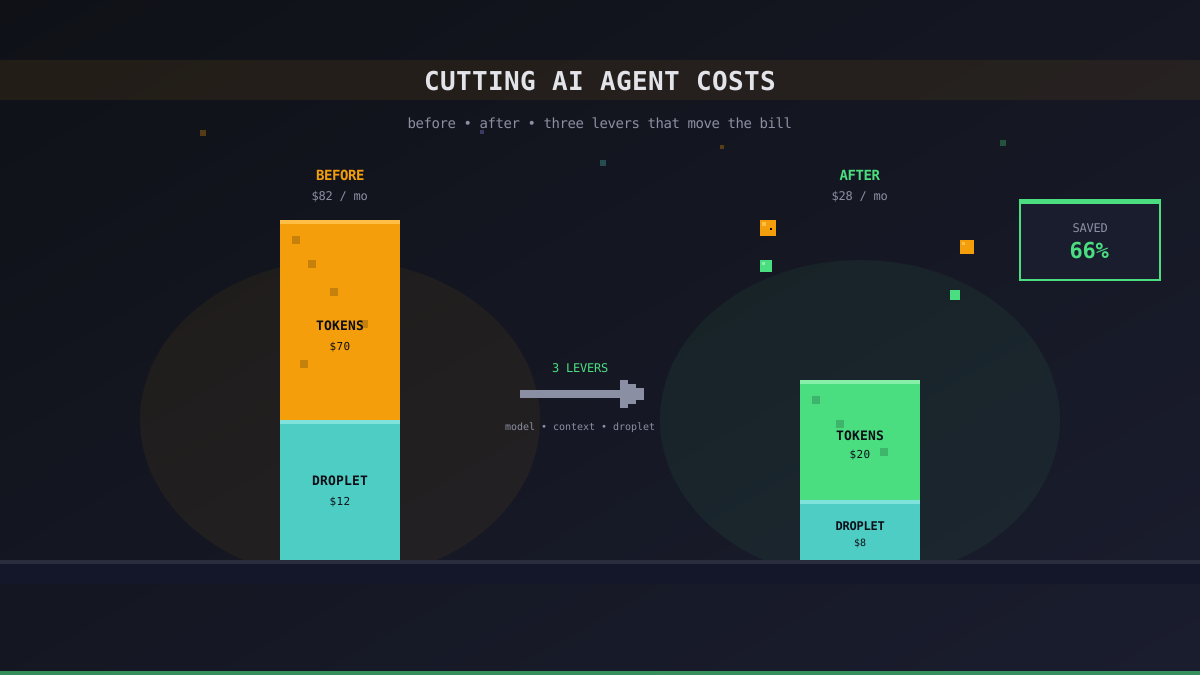
Almost every cost complaint we have seen comes down to one of three things:
- Model choice — running Claude Sonnet 4.6 or GPT-4o for tasks a cheaper model would handle
- Context bloat — the chat history keeps growing, and every new message pays for every old one
- Droplet oversizing — paying for 4GB of RAM when 1GB would do
The rest is noise. Optimize these three before you tune anything else.
Lever 1: Match the Model to the Task
Frontier models are priced for frontier work. If your Researcher agent is mostly skimming docs and summarizing, a cheaper model gets you 90% of the quality at 10% of the price. Save the expensive model for the Builder, where a bad patch wastes more of your time than token savings can recoup.
A reasonable starting point:
| Role | Model tier | Why |
|---|---|---|
| Researcher | Mid-tier (GPT-4o-mini, Claude Haiku) | Summarization is not capability-bound |
| Builder | Top-tier (Claude Sonnet 4.6, GPT-4o) | Patch quality matters more than token price |
| Reviewer | Top-tier | You want it to catch what you missed |
| Scribe | Mid-tier | Release notes do not need a PhD |
You do not need to pick once and commit. Swap providers per-agent in Office Claws and A/B test on real work for a week.
Lever 2: Don't Let Context Bloat
Every message an agent processes pays for the entire conversation up to that point. A 50-turn chat is not 50 cheap requests — it is one request plus 49 requests that each resend the whole history. The arithmetic is punishing.
Two habits that help:
- Start a new conversation when the topic changes. If you were debugging CSS and now you want to write a database migration, that is a new agent session. The CSS history adds nothing and costs on every turn
- Paste the summary, not the transcript. If you are handing work to another agent, copy the three lines that matter, not the whole thread
On Office Claws, each desk is a separate agent with its own context. That boundary is free and worth using.
Lever 3: Right-Size the Droplet
On the self-hosted plan you pick the droplet size yourself. The defaults we ship are conservative — they work for almost everyone — but if you run a single agent that mostly waits for the model to respond, you can downsize further.
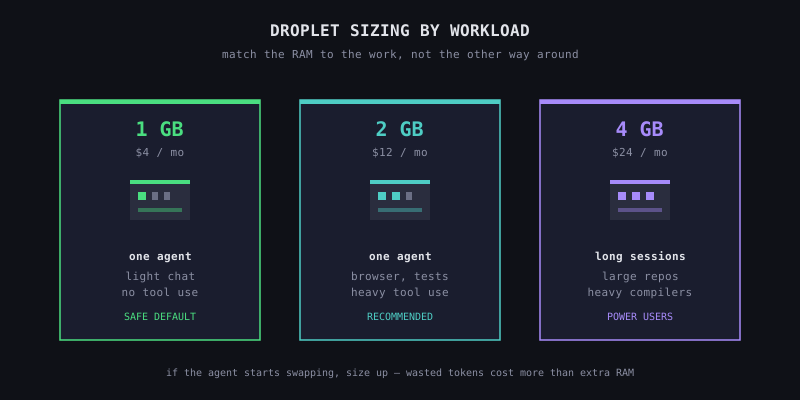
A few rules of thumb:
- One agent, light use: 1GB droplet is fine
- One agent, heavy tool use (browser, compiler, tests): 2GB
- Multiple agents on one droplet: not supported, use separate droplets
- Managed plan: start on Standard (2GB), upgrade only if the agent starts swapping
If your agent regularly runs out of memory, the fix is a bigger droplet, not a cheaper model. Killing agents mid-task wastes the tokens they already spent.
What Not to Optimize
Some tactics sound thrifty and are not:
- Forcing tiny context windows — clipping history aggressively breaks the agent's memory of what you were doing. It is cheaper to start fresh
- Batch everything into one mega-request — long requests are quadratic in some providers' pricing, and the agent handles focused questions better
- Switching to the cheapest provider globally — the cheapest model is only cheap if its output is usable. Rework is the most expensive thing you can buy
When to Spend More, Not Less
A few situations genuinely deserve the premium tier:
- Security or correctness-sensitive code — a Reviewer on a top-tier model catches bugs a mid-tier one misses
- Long, complex refactors — context retention matters, and frontier models are better at holding large codebases in mind
- One-shot high-stakes drafts — if you are writing a contract clause or a customer email, pay for the quality
Thrift is a default, not a religion. Upgrade when the stakes justify it.
A Simple Monthly Audit
Once a month, look at your provider dashboard and ask three questions:
- Which agent spent the most tokens? Does the work it did justify that?
- Was any session unusually long? Why did the conversation not end sooner?
- Is any droplet sitting at <10% CPU? Can it drop a tier?
Five minutes of this is worth more than any clever prompt engineering.
What We Are Working On
We are building a built-in cost dashboard so you do not have to tab between provider consoles. Until it ships, the audit above is the cheapest way to stay in control.
The goal is not to run the cheapest agents. It is to stop paying for work that did not need paying for.