Why OpenClaw Deployment Needs an Operating Model
OpenClaw-style work becomes serious when agents leave the laptop and start changing production repositories from a VPS. The benefit is obvious: long-running agents keep working, humans can close their laptops, and heavier builds do not burn local resources. The risk is just as obvious: a remote agent with broad credentials can make broad mistakes.
This OpenClaw deployment guide uses the safe framing Office Claws actually supports: Office Claws is not a native OpenClaw runtime. It is a local desktop and VPS management layer for OpenClaw-adjacent workflows, usually with Codex-backed agents doing the execution. If you are still choosing the runtime path, read OpenClaw vs Codex first, then use this guide to deploy the operational layer.
The OpenClaw Deployment Shape
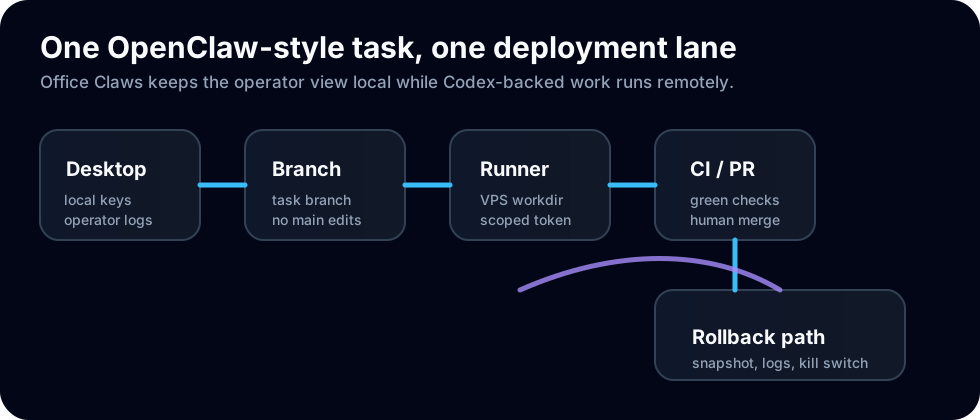
The clean deployment shape is deliberately boring: keep control local, run work remotely, and integrate through GitHub instead of letting the agent write directly to shared infrastructure.
| Layer | Runs where | Must have | Avoids |
|---|---|---|---|
| Operator console | Local desktop | task list, logs, kill switch | blind remote sessions |
| Git branch | GitHub/GitLab | one branch per task | hidden edits on main |
| Agent runner | VPS | isolated workdir, scoped token | cross-task file collisions |
| CI gate | hosted CI | build/test/lint | unreviewed broken code |
| Release decision | human | green checks and diff review | autonomous bad deploys |
A useful first target is one VPS runner per active agent lane. You can add pooling later, but early pooling tends to hide ownership. With Office Claws for OpenClaw users, the management view should answer three questions immediately: which task owns the runner, which branch it is writing, and what command is currently running.
VPS Baseline for OpenClaw-Style Agents
Start with a small, disposable VPS rather than a carefully hand-tuned pet server. The goal is a runner you can recreate, not one you are afraid to lose.
adduser agent
usermod -aG sudo agent
mkdir -p /srv/agents/openclaw-deployment-guide
chown -R agent:agent /srv/agents
Then lock down the obvious edges:
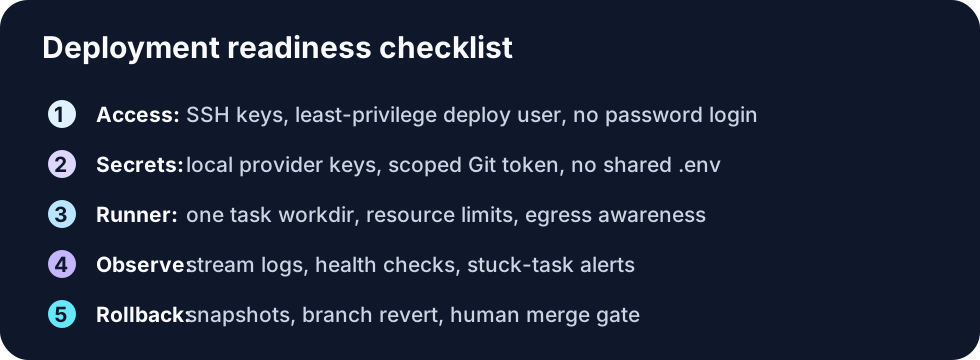
- Use SSH keys only; disable password login.
- Give the agent user access to the work directory, not the whole host.
- Install only the build tools the repository needs.
- Keep production deploy keys off the runner.
- Snapshot before major dependency or image changes.
For the deeper remote-runner pattern, pair this with OpenClaw on VPS. For Git discipline, use OpenClaw GitHub Workflow as the companion guide.
Secrets and Tokens
The most important OpenClaw deployment rule is simple: do not turn a coding runner into a secrets landfill. A runner needs enough access to clone, branch, push, and run checks. It usually does not need production database credentials, billing credentials, or a release token.
Use this split:
| Secret | Best home | Runner access? |
|---|---|---|
| Provider/API key | local Office Claws machine or secure vault | only if needed for the task |
| Git push token | scoped to repo and branch workflow | yes, narrowly scoped |
| Production deploy token | CI/release system | no |
| Customer data credentials | production secret store | no |
| SSH key to runner | local machine | no copy on the runner |
That model keeps Codex-backed execution useful without pretending it is harmless. If an agent goes off track, you should be able to revoke one token, terminate one runner, and keep the rest of the system intact. See OpenClaw Security Best Practices for the broader hardening checklist.
Deployment Steps
- Create a branch before the agent starts.
- Provision or assign a fresh VPS runner.
- Clone the repo into a task-specific workdir.
- Inject only the scoped secrets required for the task.
- Start the agent from Office Claws and stream logs locally.
- Push early to a draft PR so CI has something to evaluate.
- Run the build, tests, and security checks on the PR.
- Review the diff manually before merge or release.
- Tear down or reset the runner after the task.
The important habit is teardown. Long-lived runners collect old worktrees, old logs, and old assumptions. If a runner must stay alive, reset the workdir and rotate task tokens between jobs.
Monitoring and Rollback
Deployment is not finished when the agent says “done.” It is finished when the branch is reviewed, CI is green, and you know how to undo the change.
Track these signals:
- current command and last log line;
- CPU, memory, and disk pressure on the VPS;
- elapsed task time versus expected task size;
- pushed commits and open PR URL;
- failing test names, not just pass/fail status.
Rollback should be equally concrete: revert the branch, close the PR, restore a VPS snapshot, revoke the scoped token, or kill the runner. Office Claws is useful here because it gives OpenClaw-style teams a desktop view over remote Codex-backed agents instead of forcing everyone to remember which terminal, tmux pane, or VPS was doing the work.
Recommended Office Claws Pattern
Use Office Claws as the operator layer, not as a magic replacement for review. Keep keys local where possible, run agents on disposable VPS lanes, make every task produce a branch and PR, and let humans own the final merge.
That is the practical OpenClaw deployment model: local control, remote execution, narrow credentials, observable logs, and boring rollback. If you need the management layer, start with the OpenClaw desktop manager page, then connect it to this deployment guide for a production-ready workflow.
Related Reading
- OpenClaw vs Codex — choose the runtime and migration path.
- Office Claws for OpenClaw users — local desktop management for remote agents.
- OpenClaw on VPS — architecture for remote runners.
- OpenClaw GitHub Workflow — branches, PRs, and CI gates.