Why a VPS Is the Right Home for an OpenClaw-Style Workload
OpenClaw users picked the agent because it could run for hours without supervision — read a repo, plan a refactor, ship a branch, come back the next morning to a finished diff. That workload is a bad fit for a laptop. Closing the lid kills the session. The agent's network state vanishes when you switch Wi-Fi. And the moment the subscription tier got blocked, the API meter started ticking on every file the agent re-read while you slept.
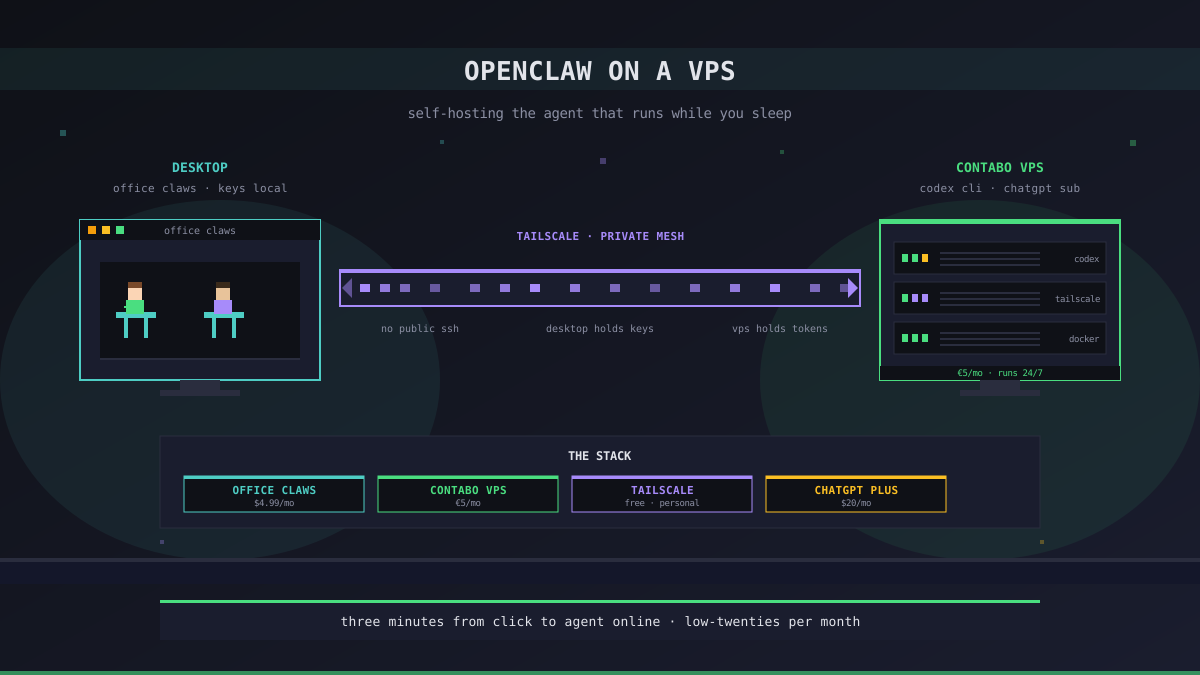
A VPS fixes all three. It stays online, it has a stable network, and the box itself costs about €5 a month. The hard part is not the server — it is the management layer on top of it: how you provision, how you sign in, how you keep the agent's keys off the internet, how you actually get a window into what it is doing.
This is a setup guide. We are going to walk through the cheapest, smallest, honest path: a single-box Contabo VPS running Codex CLI, driven by a ChatGPT subscription, managed from a desktop app. It is the path most OpenClaw users land on after a week of trying to host the agent themselves, and it is what Office Claws ships.
The Honest Caveat: We Don't Run OpenClaw Natively
Before the recipe, the disclaimer that keeps showing up in our posts because it actually matters. Office Claws is not an OpenClaw runtime. We do not embed the OpenClaw extension marketplace, we do not load OpenClaw extensions, and "running OpenClaw on a VPS through Office Claws" in the literal sense is not a thing we ship.
What we ship is the migration shape. Codex CLI on a VPS, signed in with your ChatGPT subscription, doing the eight-hour-a-day coding work that OpenClaw used to do under a flat fee. If your OpenClaw workload was 80% repo-shaped — read code, edit code, run tests, push a branch — that swap is clean. If it was 30% browsers and 30% payments and 30% framework-specific extensions, this guide is not the one you want; the OpenClaw vs Codex comparison covers when staying on OpenClaw is the right call.
Read past the framing and you have a Codex setup guide. The OpenClaw users we hear from are mostly here for that.
What You Need Before You Start
The full kit, with the prices we have actually paid:
| Component | Why | Cost |
|---|---|---|
| Contabo account | The VPS provider — we target Contabo because the €5 box runs Codex agents comfortably | €4.99/mo per box |
| ChatGPT Plus or Pro | Drives the Codex CLI — Plus for one developer, Pro for heavy parallel sessions | $20 or $200/mo |
| Office Claws desktop app | Provisions the box, runs the manager, holds the SSH keys locally | $4.99/mo (self-hosted) |
| Tailscale account | Private mesh between desktop and VPS — you will not expose SSH to the public internet | Free for personal use |
The total monthly is in the low twenties for a single developer on Plus, around $210 for a team running on Pro. That is the same order of magnitude as the OpenClaw subscription tier you may have just lost — not a miracle, but the math finally lines up again.
A note on Contabo specifically: we recommend it because it is cheap and consistent. Other providers work; the snapshot-based provisioning we ship targets Contabo first because that is where most of our users have ended up. If you already have a DigitalOcean or Hetzner footprint, the agent will run fine there too — you will just provision the box yourself and skip the snapshot step below.
The Setup Recipe
1. Install Office Claws and connect Contabo
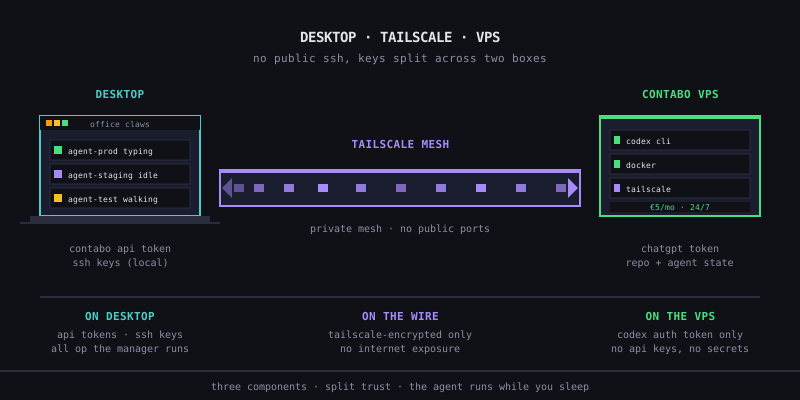
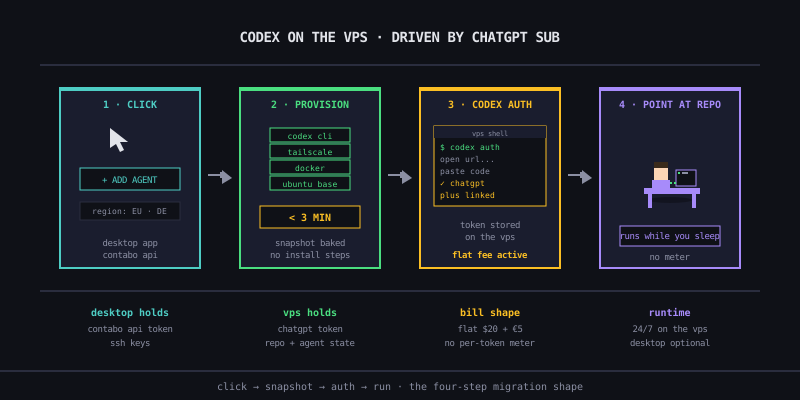
Download the desktop app, install it, and sign in. The first thing the app asks for is a Contabo API token — paste it in once and it stays in your local OS keychain. We do not upload it. The token is what lets the app provision and tear down VPSs on your behalf, but every operation runs from your desktop, not from our servers.
2. Provision the agent
In the app, click "Add agent" → pick a Contabo region → confirm. The provisioning flow uses a pre-baked Contabo snapshot with Docker, Tailscale, and Codex CLI already installed and a sentinel file at /etc/openclaw-snapshot-version that tells the bootstrap script "skip the install steps, you are already done." Total time from click to "agent online" is consistently under three minutes; the previous vanilla-Ubuntu path took eight to ten.
The agent comes up on a private Tailscale IP, not a public one. Public SSH is closed by default. The only path into the box is the tunnel between your desktop and the VPS, brokered by Tailscale's mesh.
3. Sign in with your ChatGPT subscription
Inside the agent, run codex auth. The Codex CLI walks through the OAuth flow against your ChatGPT account; the resulting token is stored on the VPS, not on your desktop. From this point on, your Plus or Pro subscription drives the agent's calls — no Anthropic API key, no per-token meter, no idle-agent billing.
This is the substitution that does the work. OpenClaw on the API was a meter; Codex on a ChatGPT subscription is a flat fee. The host is different, the agent is different, but the bill shape is the one OpenClaw users were paying for two months ago.
4. Point the agent at a repo
Same workflow you would have given an OpenClaw agent. Pick a repo, branch off, hand the agent a task description and constraints. The agent runs codex inside a Docker container on the VPS; closing your laptop lid does not kill the session, switching Wi-Fi does not drop the connection, and the agent stays running while you sleep without billing you for the privilege.
The desktop app's "Office" view shows each agent as a pixel-art character at a desk — typing animation while it is working, idle animation when it is not, walking to a sofa during long test runs. We will own this is partly aesthetic, but it is also a faster status check than reading log lines.
What This Setup Does Not Do
A few things we want to be honest about before you commit.
- It does not run OpenClaw. If your workload depends on OpenClaw extensions — the QClaw consumer flows, Alipay AI Pay integrations, the CoinGecko data pulls, anything from the wider OpenClaw ecosystem — those do not port. You are switching agents, not wrapping them.
- It does not give you a Claude-driven agent. Codex is OpenAI-only. If multi-provider model abstraction was load-bearing in your stack, this setup flattens it.
- It does not replace team-level audit logs. Anthropic's API plans ship audit logs, DPAs, and per-project cost allocation. ChatGPT subscriptions do not. For finance teams that wanted one line item per workload, the API path is still the right shape; you just pay more for it.
- It does not eliminate the cap. ChatGPT Plus and Pro both have soft rate limits. They are generous — most single-developer days stay well under — but a team running parallel agents on a single Plus account will hit them. Pro, or one Plus per developer, is the practical answer.
If any of those bullets describes a hard requirement, the migration is not a strict win. The OpenClaw vs Codex comparison gets into when each agent is the right pick — read it before paying for the swap.
The Operational Half
Provisioning the box is the easy part. Running an agent on it for a month without surprises is the part that takes some habits.
A few we have settled into:
- Set a Contabo spend cap. Even though Codex is flat-fee on the API side, the VPS itself bills per hour. A runaway provisioning bug spinning up boxes for an afternoon is the failure mode that costs money. The desktop app exposes the cap; pick a number.
- Use one Tailscale ACL per agent role. The default ACL lets your desktop reach every agent. If you start handing agents to teammates, narrow the ACL so each desktop only sees the agents assigned to it. This is the local-first key model the OpenClaw security post walks through end-to-end.
- Snapshot, do not rebuild. When an agent's state goes sideways — bad install, broken Docker layer, a Codex auth that got into a weird state — destroy and reprovision. Snapshot-based provisioning is fast enough that "burn it down" is the cheapest debugging path. We learned this the hard way.
- Watch the ChatGPT cap, not the token meter. The mental model from OpenClaw on API is "every read costs money." That is the wrong frame here. The right frame is "rate limit per hour"; the meter is gone.
These are not Office Claws-specific habits. Anyone running Codex on their own VPS will land on the same list within a few weeks. We are codifying it because OpenClaw veterans tend to bring the metered-billing reflexes with them and it takes a beat to drop them.
When to Pick This vs Stay on OpenClaw
Quick recommendation since this is already long:
| Your workload | Pick |
|---|---|
| 80%+ coding inside repos, eight-hour autonomous sessions | Codex on a VPS (this guide) |
| Mixed code + browser + payments + framework extensions | Stay on OpenClaw, absorb the API bill |
| Team needs audit logs, DPAs, per-project cost allocation | Stay on OpenClaw on API plans |
| One developer, $20–25/mo total budget, mostly code | Codex on a VPS (this guide) |
| Heavy parallel agents, multiple repos in flight | Codex Pro on a VPS (one box per agent) |
The "mixed workload" case is the one where the migration burns. If half your OpenClaw time was outside a repo, this setup is a downgrade — you trade a wide platform for a narrow tool. If the work was always coding and the agent runtime was incidental, this is the cheapest path back to the flat-fee shape.
Recommendation
If you came from a blocked OpenClaw subscription and your workload is repo-shaped, the recipe above is the one we ship and the one most users in your situation end up on. The total monthly cost for a single developer lands in the low twenties — a Contabo box, a ChatGPT Plus subscription, and the Office Claws desktop app — and the agent runs continuously without a meter.
If your workload is genuinely platform-shaped, this guide is the wrong recommendation. Stay on OpenClaw on the Anthropic API, set spend caps aggressively, and treat Codex as a CLI you might pair with it for the coding-specific slice. The wider migration narrative is in the OpenClaw subscription block migration guide — start there if you have not already.
The shape of the work decides the shape of the bill. A VPS is the cheapest cure for an agent that wants to run while you sleep; pick the agent that runs flat on top of it.
Related Reading
- OpenClaw Subscription Blocked? The Codex Migration Path — the broader migration story
- OpenClaw vs Codex: A Clear-Eyed Comparison — when each agent is the right pick
- Provisioning Under 3 Minutes — the snapshot mechanics behind step 2
- Self-Hosted vs Managed — picking the Office Claws plan that matches this setup