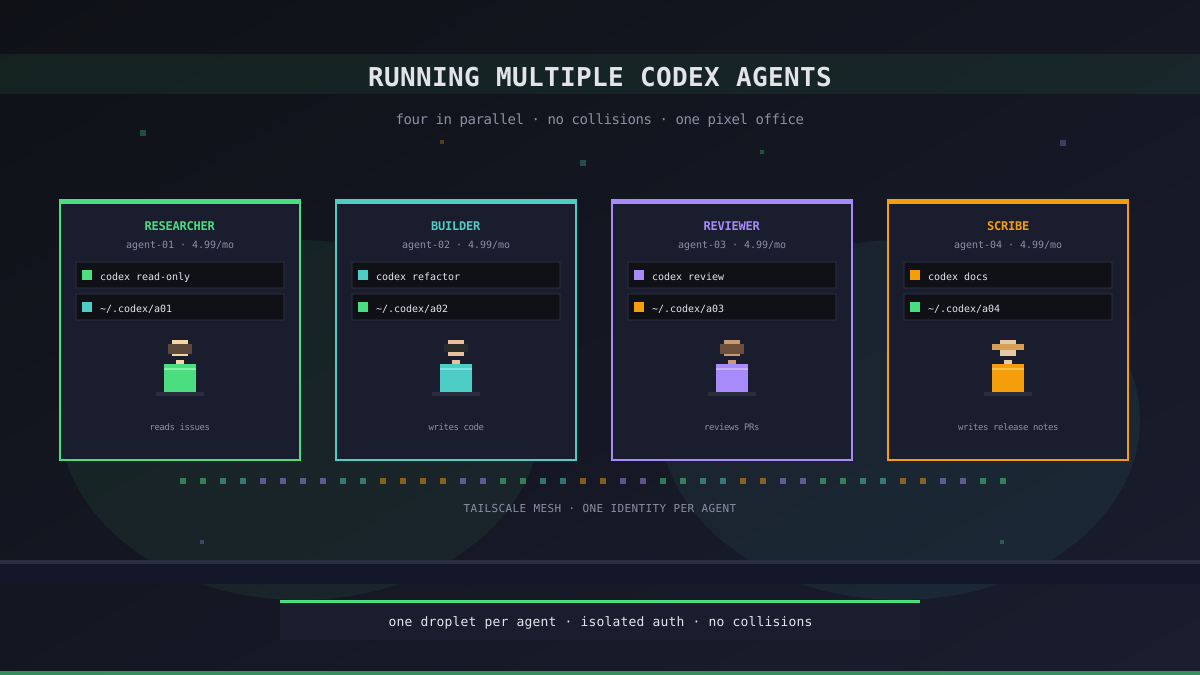
One Codex Is Easy. Four Is an Ops Problem.
Running a single Codex agent is a codex command away. It logs in, picks up your repo, does its thing. Most people's first "multi-agent" attempt is just opening four terminals and typing the same command four times. It sort of works, for about ten minutes — until two agents race for the same files, or one of them eats through a ChatGPT Plus message cap and takes the other three down with it.
The real question is not whether you can run several Codex agents at once. It is how to make them stay out of each other's way. We run four to six Codex agents in parallel most days, and the failure modes are consistent. Here is the setup that survives them.
What Actually Collides When You Run Agents in Parallel
Before picking a setup, it helps to be precise about what breaks. We have watched three categories of collision:
- Auth collisions. The Codex CLI caches its subscription credentials in
~/.codex/. Two processes sharing that directory will fight over token refresh, log each other out, or trigger a re-auth loop that locks the account for several minutes - Filesystem collisions. Two agents editing the same working tree will overwrite each other's changes. Even one agent running
go testwhile another is mid-edit will produce phantom failures that waste a chunk of context trying to debug them - Rate-limit collisions. ChatGPT Plus caps on messages per rolling window, across the whole account. Four hungry agents on one Plus account will trip that cap at about a quarter of their individual runtime — one noisy agent starves the quiet ones
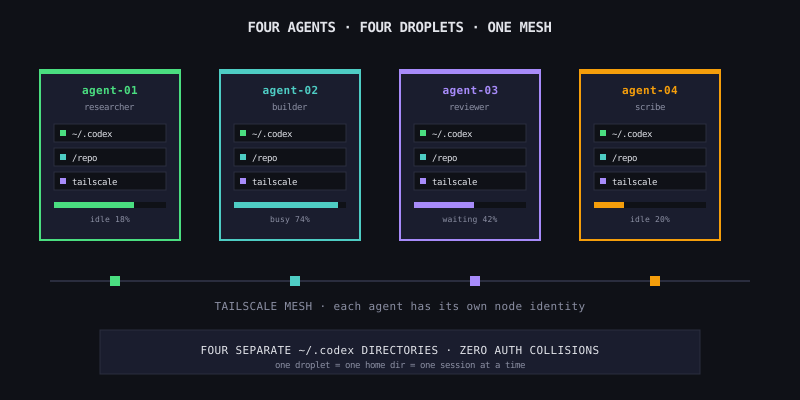
The fix to all three is the same: give every agent its own box, its own home directory, and — if you are running them hard — its own account.
The Setup That Survives Real Use
On Office Claws, every agent you create lands on a dedicated DigitalOcean droplet, provisioned in about two and a half minutes. That droplet has its own ~/.codex/ directory, its own repo checkout, and its own Tailscale identity. You do not have to think about any of the collisions above — the isolation is the default.
| Concern | Multi-terminal on laptop | Office Claws multi-agent |
|---|---|---|
| Auth cache | Shared ~/.codex/ — races | Separate per droplet |
| Working tree | Shared — overwrites | One repo per agent |
| Rate limit | One account, all agents | One account per agent (optional) |
| Recovery | Kill all terminals | Restart one droplet |
| Visibility | 4 tmux panes | 4 desks in the pixel office |
A typical four-agent day looks like this:
researcher-agent  → reads issues, writes tickets
builder-agent     → takes a ticket, implements it
reviewer-agent    → reviews the builder's PRs
scribe-agent      → writes release notes, updates docs
Each lives on its own VPS. Each has its own Codex session. Each shows up as a separate character in the pixel office so you can see, at a glance, who is working on what.
Two Paths for the Subscription Side
The second question is how many ChatGPT accounts you need. This is less obvious than the infra side, and the answer depends on how hard the agents work.
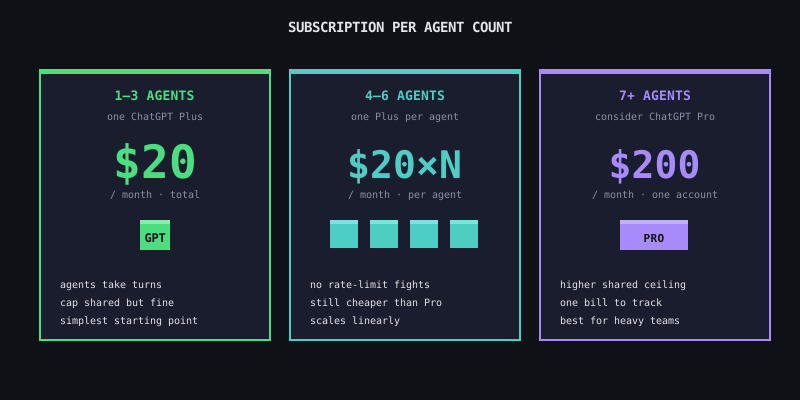
One subscription, several agents. For light-to-moderate use — two or three agents, a few hours of work each per day — a single ChatGPT Plus subscription ($20/month) covers everything. Plus caps on messages per rolling window, not per account-per-device, so two agents taking turns stay well under the ceiling. This is the starting point.
One subscription per agent. Once you have four or more agents running more than a few hours each, you will start seeing rate limit warnings. At that point it is cheaper to add a second Plus subscription than to upgrade to Pro, especially if two of the agents are doing mostly passive work (watching, summarizing) and two are doing heavy coding. Plus at $20/mo × N parallel accounts scales cleanly up to around six agents; above that, Pro at $200 starts to make sense.
Three Patterns We Use Daily
The setup is only half the picture. The agents need a role, and the roles need to be narrow enough that they do not stomp on each other:
- Pipelined. Researcher hands a ticket to builder, builder hands a PR to reviewer, reviewer hands a merge to scribe. Each agent waits on the one in front of it. Slow but quiet — no collisions because only one agent is active on a file at a time
- Fan-out. One planner agent produces N independent tickets, N builder agents pick them up in parallel from different repos. Fast but needs discipline on scope — never two builders on the same module
- Watcher + worker. One agent tails logs / PRs / issues and pings you; others take on specific tasks when you approve. Zero conflict risk, very efficient for oncall-style workflows
The patterns are not exclusive. Most days we run one pipelined pair plus a standalone watcher — five agents, zero collisions, because the pipeline serializes access to the shared files and the watcher never writes anything.
What to Skip
A few things sound like good ideas and will cost you a day:
- Sharing a single git clone between agents. Even with branches per agent, stash / commit hooks / build caches will fight. One clone per agent, per droplet
- Running more than one Codex process per droplet. The 1GB-RAM basic droplet can handle one CLI comfortably; a second one OOM-kills the first in the middle of a refactor
- Round-robin on one Plus account when you are actively hitting limits. If you are seeing the "you've used your messages" screen on one agent per day, the cost of a second Plus ($20) is lower than the cost of lost context on the agents that get cut off
Starting From Zero
If you want to try this without committing to the full setup:
- Spin up two Office Claws agents. Self-hosted on our $4.99/mo app with $4/mo droplets lands you at about $13 total for the first two
- Assign one a narrow watcher role (summarize open PRs every morning) and the other a builder role (work on a specific repo)
- Let them run for a week. You will see the collision modes in practice, and the shape of the ceiling on one Plus subscription
- Add the third agent with a separate ChatGPT account only if you have seen rate limits bite more than twice in that week
The rule we keep coming back to: pay for isolation where it saves time, and share where it does not. Droplets are cheap, subscriptions less so, and the middle ground is where most useful multi-agent setups live.
Related Reading
- Multi-Agent Workflows: Running Specialized AI Teams — the role-based side of the same problem
- Long-Running Codex Tasks — why each of those parallel agents needs a VPS, not a laptop
- Self-Hosted vs Managed — picking the plan that matches the agent count