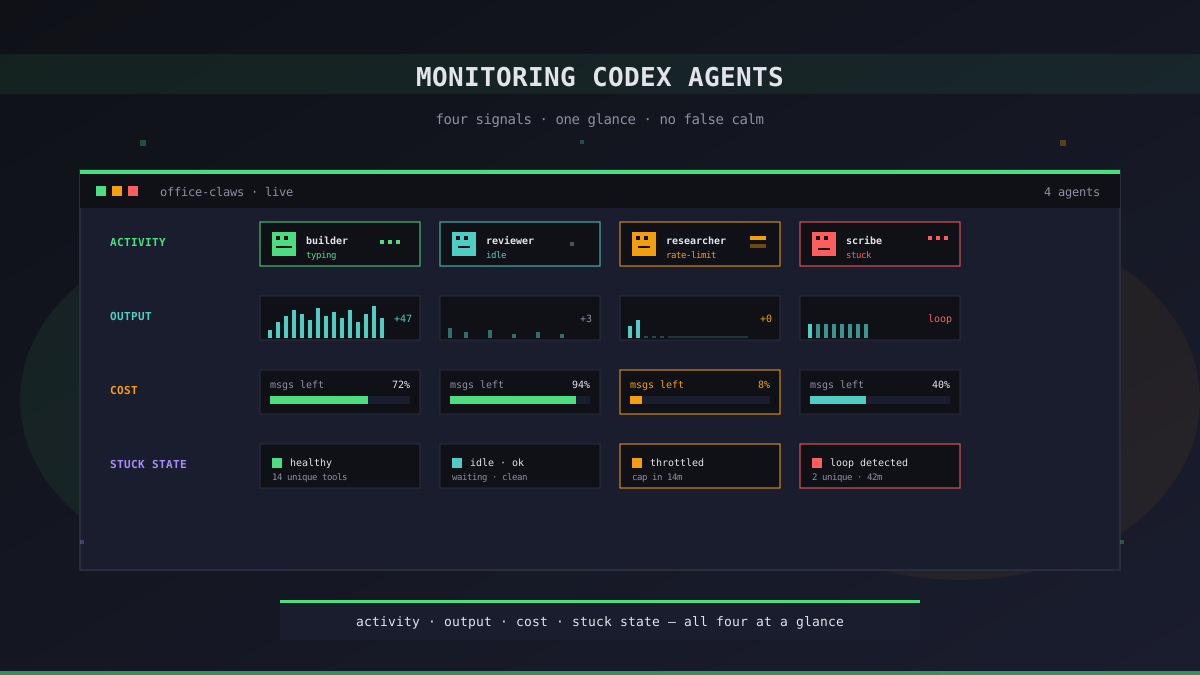
"The Process Is Running" Is Not a Useful Answer
A Codex agent that has been running for two hours can be in three very different states. It can be making progress, grinding through a refactor and touching one file every few minutes. It can be looping — re-reading the same files, re-asking the same questions, burning tokens without moving forward. Or it can be waiting on a rate limit, technically alive but producing nothing.
Every normal monitoring tool — htop, systemctl status, uptime pings — will tell you the same thing for all three: the process is up. That answer is worse than useless, because it makes you think things are fine when two of the three outcomes mean you are paying for nothing.
Monitoring a coding agent is a different problem than monitoring a web server. Here are the signals we watch on Office Claws, why they matter, and what each one tells you that ps aux does not.
Signal 1: Activity — What the Agent Is Doing Right Now
The single most useful thing to know about a running agent is whether it is currently thinking, typing, or idle. Not "did it log a line in the last five minutes" — that is a lagging indicator. We mean the live state: is the token stream flowing, is it reading a file, is it waiting on a shell command.
On Office Claws every agent has a desk in the pixel office, and the character sitting at that desk is in one of three animated states: walking, typing, or idle. That animation is not a gimmick — it is a live projection of the agent's actual state, driven by the same RPC stream that powers the activity feed. You glance at the office and you know without reading a log which agents are actively working and which are parked.
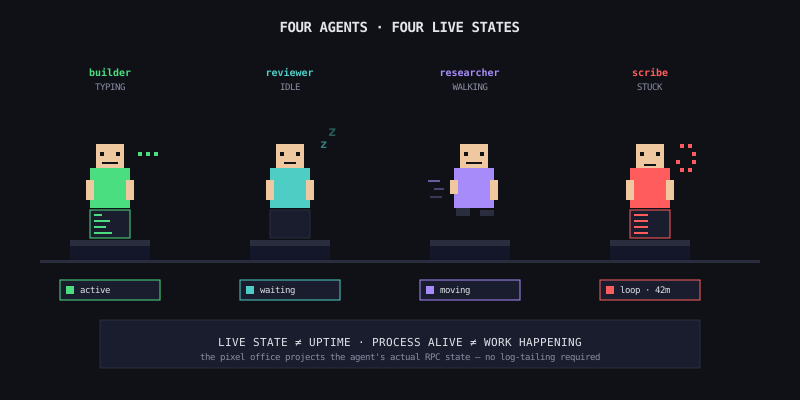
Text-based equivalents work too. The Codex CLI emits events as it runs — tool calls, file reads, model turns. Tailing that event stream tells you the same thing a spinner would, just in a terminal. The important part is distinguishing "process alive" from "process doing something."
Signal 2: Output — Are Files Actually Changing
An agent that is "typing" in its terminal but has not modified a file in thirty minutes is not working. It is conversing with itself. This is the most common failure mode we see on long-running tasks — the model gets into a discussion with its own scratchpad, produces no diffs, and burns an hour before anyone notices.
The cheap way to catch this: a watch on the working tree.
# On the VPS, log file changes every minute
while true; do
  find /repo -type f -newer /tmp/last-check 2>/dev/null | wc -l
  touch /tmp/last-check
  sleep 60
done
If that number is zero for three windows in a row on a task that should be producing diffs, the agent is stuck. Interrupt it, summarize what it has learned so far, and restart with a tighter prompt. Letting it continue is almost always a waste.
A related signal: commit cadence. We ask our builder agents to commit after each logical change. An agent that has not committed in an hour on a task that started with "refactor these 20 files" is telling you something — usually that the task was under-specified.
Signal 3: Cost — Tokens, Messages, and the Rate-Limit Cliff
Subscription Codex (ChatGPT Plus or Pro) does not bill you per token, but it does cap on messages per rolling window. API-mode Codex bills you per token with no cap. Both care about volume, for different reasons.
| Mode | What runs out | Warning signal | What happens when it's hit |
|---|---|---|---|
| ChatGPT Plus | Message cap (rolling 3h / 24h) | "you have X messages remaining" | Agent stalls silently until window rolls |
| ChatGPT Pro | Effectively uncapped for most work | Soft slow-downs under extreme load | Rarely — the $200 ceiling is hard to hit |
| Codex via API | Your credit card | Token spend graph | Spend keeps climbing until you notice |
The subscription case is the dangerous one for monitoring, because a rate-limited agent looks running. The process is up, the terminal is open, the CLI is waiting. But every new request gets throttled and nothing comes back. Without a rate-limit indicator you will not know until you check the output and see six hours of nothing.
We surface remaining messages directly in the Office Claws activity feed — when the count drops under 10% the agent's badge turns amber. You can wire the same thing into any setup: the Codex CLI exposes the limit headers, and a small jq script can fire a notification when the remaining count crosses a threshold.
Signal 4: Stuck State — The Silent Failure
The hardest class of failure to catch is the agent that is technically producing output but making no progress. We see three shapes of this regularly:
- Read loop. Agent reads the same five files over and over, each time summarizing slightly differently, never writing anything. Token burn is real, progress is zero
- Test-fix-test spiral. Agent runs tests, sees a failure, "fixes" it in a way that creates a new failure, runs tests again, forever. Each cycle produces a diff, so naive output monitoring does not catch it
- Rate-limit retry storm. Agent hits the cap, retries every few seconds, logs "retrying..." indefinitely. CPU is low, memory is low, logs scroll, nothing happens
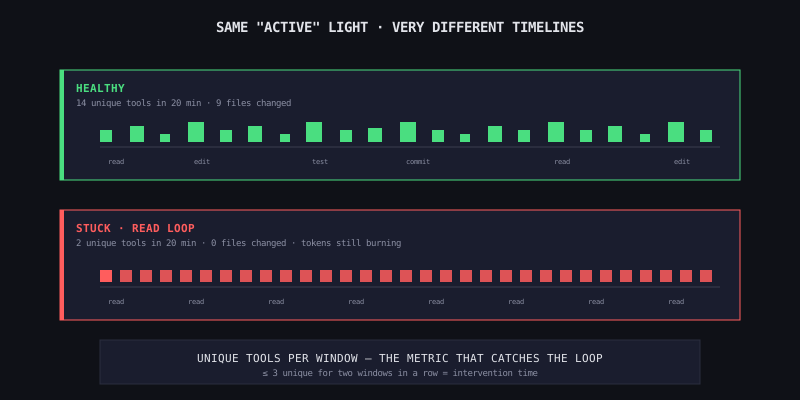
The tell for all three is repetition. A healthy agent's log is a sequence of different actions — read this file, then this one, then write that one, then run this command. A stuck agent's log is the same three lines interleaved for an hour. The simplest alarm that catches this reliably is a "unique tool calls in the last 20 minutes" metric. If the answer is two or three, the agent is in a loop.
How Office Claws Surfaces These Signals
Every one of the above is implemented in the desktop app as of this month:
- Activity feed — live stream of every tool call, file read, command, and model turn from every agent, unified in one panel
- Pixel office states — walking / typing / idle, driven by the RPC stream from the agent's VPS
- Log stream — full stdout/stderr per agent, scrollback included, filterable per agent
- Rate-limit badges — colored indicator per agent when remaining messages drop below the warning threshold
- Idle detection — agents that have produced no output for a configurable window get flagged in the office; the character animation switches to idle and the desk badge turns yellow
The point is not that you have to use Office Claws to get this. The point is that these four signals are what a coding-agent dashboard needs to show, and any homegrown setup that skips one of them will let the matching failure mode through.
What Not to Monitor
Three things that feel like they should matter and usually do not:
- CPU and memory on the VPS. A Codex CLI session uses ~200MB of RAM and almost no CPU — the work happens in the model, not on the droplet. If your agent is CPU-pegged something is wrong with your code, not with the agent
- Network uptime. Tailscale handles reconnects automatically. A 30-second drop does not affect a running agent session. Alerting on it will just generate noise
- "Still running after N hours" as a success signal. Runtime alone is a trap — a stuck agent will happily run for 24 hours. Pair runtime with output to get something meaningful
A Minimal Homegrown Setup
If you are not using Office Claws and want the equivalent, here is the shortest path:
# /etc/systemd/system/codex-watch.service (simplified)
# Logs activity, tracks file changes, alerts on stuck state

*/5 * * * * /opt/codex-watch/check.sh >> /var/log/codex-watch.log
Inside check.sh:
- Parse the last 20 minutes of the Codex event log, count unique tool invocations
- Count files modified under
/repoin the last 20 minutes - Read the rate-limit header from the most recent API response
- If unique-tools ≤ 2 and files-changed = 0 for two windows in a row, fire a webhook
That is the whole thing. Forty lines of shell, one cron, one webhook to wherever you read notifications. Crude, but it catches the three failure modes that matter. The pixel office is nicer to look at, but it is solving the same problem.
The One-Line Version
Monitoring a coding agent is not about whether the process is alive — it is about whether the work is moving. Activity says doing something, output says producing something, cost says can it keep going, stuck state says is it actually making progress. Watch all four. Trust none of them individually.
Related Reading
- How to Run Multiple Codex Agents at Once — monitoring gets harder in proportion to agent count
- Long-Running Codex Tasks — why overnight tasks need all four signals, not just uptime
- Cutting AI Agent Costs — the cost signal in more detail, including when to switch from Plus to Pro