The Problem
When we first built Office Claws, the provisioning pipeline targeted DigitalOcean, and getting a new AI agent online took around 8 minutes. For a product that promises simplicity, asking users to wait 8 minutes before they could even say hello to their agent was unacceptable.
Most of that time went to:
- Installing Docker and dependencies on a fresh Ubuntu VPS (~5 minutes)
- Configuring Tailscale networking (~1 minute)
- Pulling and starting the agent container (~2 minutes)
Run your first agent in about 3 minutes
Install the Office Claws CLI, connect your Contabo account and Codex subscription, and your agent gets its own VPS and a desk in the office.
curl -fsSL https://officeclaws.com/downloads/install.sh | sh$4.99/mo + your own Contabo VPS · keys stay in your keychain
The Solution: Snapshot-Based Provisioning
In that first version, instead of installing everything from scratch on every new server, we pre-built a DigitalOcean snapshot with Packer. Office Claws has since moved to Contabo only — every agent now runs on a VPS in the user's own Contabo account — and the same idea lives on as a Contabo custom image. Packer boots an Ubuntu 24.04 cloud image, bakes in the dependencies, and produces a QCOW2 image that includes:
- Docker CE pre-installed and configured
- Tailscale binary ready to join a network
- All system packages and dependencies
- Agent runtime container pre-pulled
- Swap configured for small VPS sizes
- The
/etc/openclaw-snapshot-versionsentinel file
When a user creates a new agent, we create (or reinstall) their Contabo VPS from this image instead of vanilla Ubuntu.
The Bootstrap Script
Our bootstrap_vps.sh script detects whether it is running on a snapshot by checking for a sentinel file:
if [ -f /etc/openclaw-snapshot-version ]; then
  echo "Snapshot detected, skipping installation"
  # Only configure Tailscale and start agent
else
  echo "Fresh install, running full setup"
  # Install Docker, Tailscale, dependencies...
fi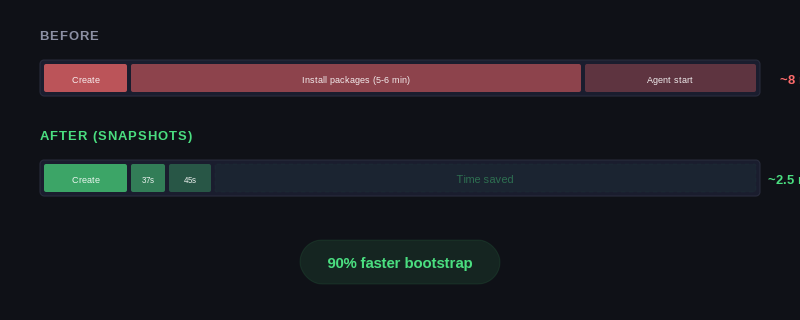
Results
| Step | Before | After |
|---|---|---|
| VPS creation | 60s | 60s |
| Bootstrap (install) | 5-6 min | 37s |
| Agent startup | 2 min | 45s |
| Total | ~8 min | ~2.5 min |
The bootstrap phase went from 5-6 minutes to just 37 seconds — a 90% reduction. These numbers were measured on the original DigitalOcean pipeline; on today's Contabo custom image the end-to-end time stays in the same two-to-three-minute range.
How We Keep Snapshots Fresh
A scheduled GitHub Actions workflow rebuilds the image weekly. This ensures the base image always has the latest security patches and our most recent agent runtime. We register it through Contabo's Custom Images API rather than snapshotting a single instance, because a per-instance snapshot cannot be used to reinstall a VPS that already exists in a user's account.
The workflow:
- Boots the Ubuntu 24.04 cloud image in QEMU with Packer on a GitHub runner
- Runs the same prebake script (apt packages, Docker, Tailscale, agent image, swap, sentinel)
- Cleans SSH host keys, machine-id, and cloud-init state so every VPS boots fresh
- Publishes the QCOW2 as a release asset
- Registers it with Contabo's Custom Images API so new and reinstalled VPSs boot from it
What Users See
From the user's perspective, they run officeclaws onboard (or click "Add agent" in the desktop app) and watch the progress. Within about 2–3 minutes, their agent appears at a desk in the pixel-art office, ready to chat.
No manual installs. No SSH. No waiting.
What is Next
We are exploring ways to push this even further:
- Pre-warmed VPS pools — Keep idle VPSs ready to go, reducing provisioning to under 30 seconds
- Edge deployment — Using smaller, regional providers for lower latency
- Container-only mode — For users who already have infrastructure and just want the agent runtime