The Cost Question Behind Every OpenClaw Setup
OpenClaw made agent workflows feel cheap because the product hid a lot of complexity behind a subscription. That worked until teams started running agents for hours, adding MCP servers, and discovering that “one chat subscription” and “one autonomous worker” are not the same billing shape.
This OpenClaw cost comparison is the math we use when developers ask whether to stay on a subscription workflow, move to metered APIs, or run Codex-backed agents through Office Claws on their own VPS. The short answer: subscriptions are usually cheapest for interactive Codex work, APIs are best for controlled automation, and a small VPS is the missing line item that makes long-running agents reliable without changing the token economics.
Office Claws is not an OpenClaw runtime. It is a Codex-first desktop manager for developers who want the same agent ergonomics with clearer hosting and cost control. That distinction matters: the honest migration path is not “OpenClaw but renamed.” It is “run the coding-agent work on Codex, host it predictably, and keep the operator in control.”
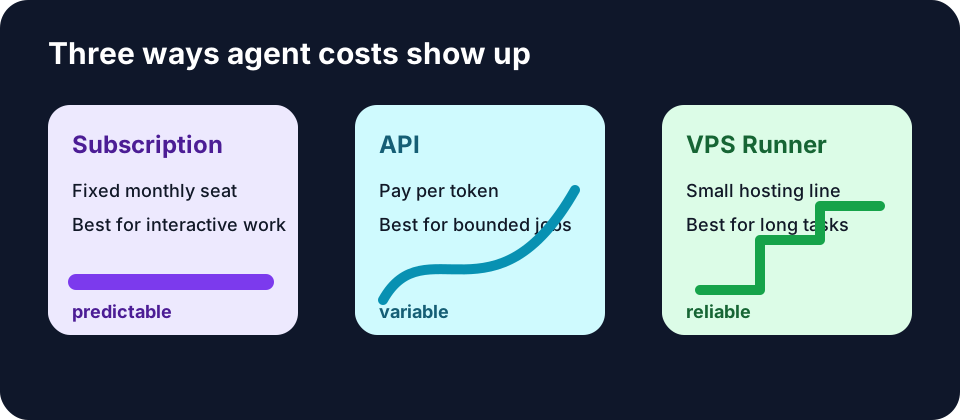
The Three Billing Shapes
Most OpenClaw teams end up comparing three options.
| Model | What you pay for | Best fit | Hidden cost |
|---|---|---|---|
| Subscription | A fixed monthly seat, usually with fair-use caps | Interactive coding sessions | Cap surprises, blocked tiers, laptop uptime |
| API | Every input and output token | Deterministic jobs, CI, backend automation | Runaway loops, high variance |
| Codex on VPS | Codex subscription plus a small server | Long-running agent work | VPS hygiene and monitoring |
The mistake is treating these as interchangeable. They are not. A human asking Codex to refactor a function twenty times in a day behaves very differently from an unattended agent that reads a monorepo for six hours, retries failing tests, and writes logs the whole time.
Where Subscriptions Still Win
A $20/month Codex-style subscription is hard to beat for hands-on work. If you spend the day asking for patches, reviewing diffs, and steering the model, the subscription smooths out usage spikes. You know roughly what the month costs before the first prompt.
That is why Office Claws keeps the subscription path central. The desktop app manages agents and hosts; Codex supplies the model access. You do not need to turn every coding session into an API bill just because the agent runs somewhere other than your laptop.
Subscriptions stop being clean when one of three things happens:
- the provider blocks or narrows the tier you relied on;
- the task needs to run while your laptop is asleep;
- multiple agents share one seat in ways the provider policy does not allow.
That is the OpenClaw subscription-block story in miniature. The model bill may be predictable, but the operational model can still break.
Where APIs Are Worth Paying For
APIs are the right answer when the workflow is machine-shaped: fixed prompts, strict budgets, small context, measurable output. A nightly “summarize these ten PRs” job is a good API workload. A CI gate that asks a model to classify one error log is another.
They are a worse default for exploratory coding agents. The reason is variance. A single agent loop that rereads a 200,000-token context ten times can turn a quiet afternoon into a real bill. Add retries, tool traces, and verbose logs, and the API stops feeling like precision pricing.
Use APIs when you can put all of this in writing before the job starts:
max input tokens per run
max output tokens per run
max retries
hard timeout
expected number of runs per month
If you cannot set those numbers, you probably want a subscription-backed workflow with monitoring before you want raw API metering.
The VPS Line Item Is Smaller Than the Failure Cost
The part many OpenClaw cost comparisons miss is hosting. A coding agent that only works while your laptop stays awake is cheap in the same way a free cron server is cheap if it never runs.
A small VPS changes the reliability shape. For roughly $4–$6/month self-hosted, the agent can keep running through lid close, WiFi changes, travel, and overnight jobs. Managed hosting costs more, but it buys provisioning, updates, and support instead of turning your team into part-time ops.
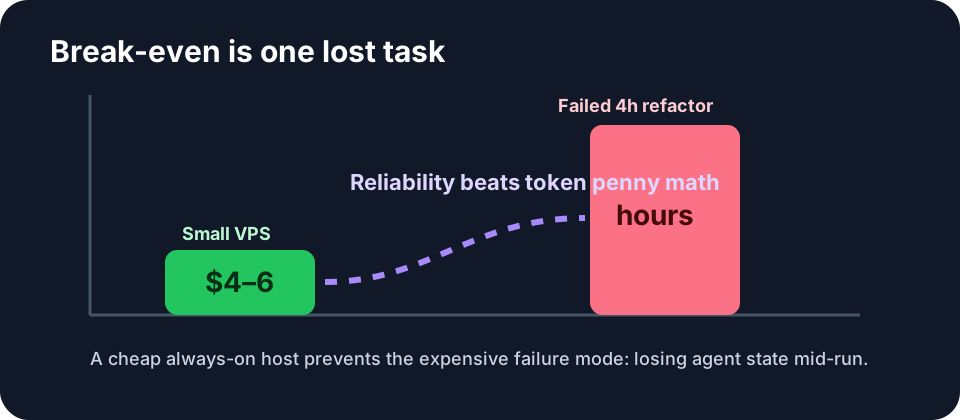
The break-even point is usually not token spend. It is one lost task. If an overnight refactor dies after four hours because a laptop slept, the wasted engineering time dwarfs a month of VPS cost.
A Practical Monthly Cost Model
Here is the model we recommend teams use before migrating an OpenClaw workflow.
- Count human-driven hours. If a person is steering the agent, subscription economics usually win.
- Count unattended hours. If the job must survive sleep, network changes, or a calendar invite, budget for VPS hosting.
- Separate repeatable automation. If the prompt and budget are stable, API metering may be cleaner.
- Add failure cost. One lost long-running job per month usually justifies the server.
- Add policy risk. If your workflow depends on a provider tier that may block OpenClaw-style usage, price the migration path now.
A realistic solo-developer setup often lands here:
| Item | Monthly cost | Why it exists |
|---|---|---|
| Codex subscription | $20 | predictable interactive model access |
| Office Claws self-hosted | $4.99 | desktop manager and provisioning layer |
| Small VPS | about $4–$6 | always-on agent runner |
| Total | about $29–$31 | cheaper than one failed afternoon |
The first 100 Office Claws users get self-hosted at $2.99/month, which brings the stack a little lower, but the important point is the shape: fixed subscription plus tiny hosting line, not an unbounded per-token meter.
When Office Claws Is the Cheaper OpenClaw Alternative
Office Claws is the cheaper path when your OpenClaw bill is really a reliability bill: agents need to keep running, you need token visibility, and you do not want to rebuild a desktop/VPS control plane yourself. It is especially strong for Codex users who already have a subscription and mainly need remote runners, monitoring, and safer key handling.
It is not cheaper for every case. If you run one small API job per week, do not add a desktop manager and VPS. If your team already has a mature Kubernetes runner with budget enforcement, keep it. The product earns its keep when agent work is frequent, interactive, and long-lived enough that laptop-based workflows waste time.
For the migration comparison, start with OpenClaw vs Codex. For the product path, see Office Claws for OpenClaw users or download the app when you are ready.
The Rule of Thumb
Use this rule:
- Interactive coding: subscription + Office Claws runner.
- Repeatable automation: API with hard caps.
- Long-running exploratory work: subscription economics on an always-on VPS.
- Blocked OpenClaw tier: migrate the workflow to Codex instead of waiting for policy to change.
Cost comparisons get noisy when they start with token prices. Start with the shape of the work. Once you know whether the agent is interactive, repeatable, or long-running, the cheapest safe architecture becomes obvious.
Related Reading
- OpenClaw vs Codex — the migration tradeoffs behind this cost model
- OpenClaw Subscription Blocked? — what to do when subscription access disappears
- Codex Subscription vs API Cost — the deeper Codex billing breakdown