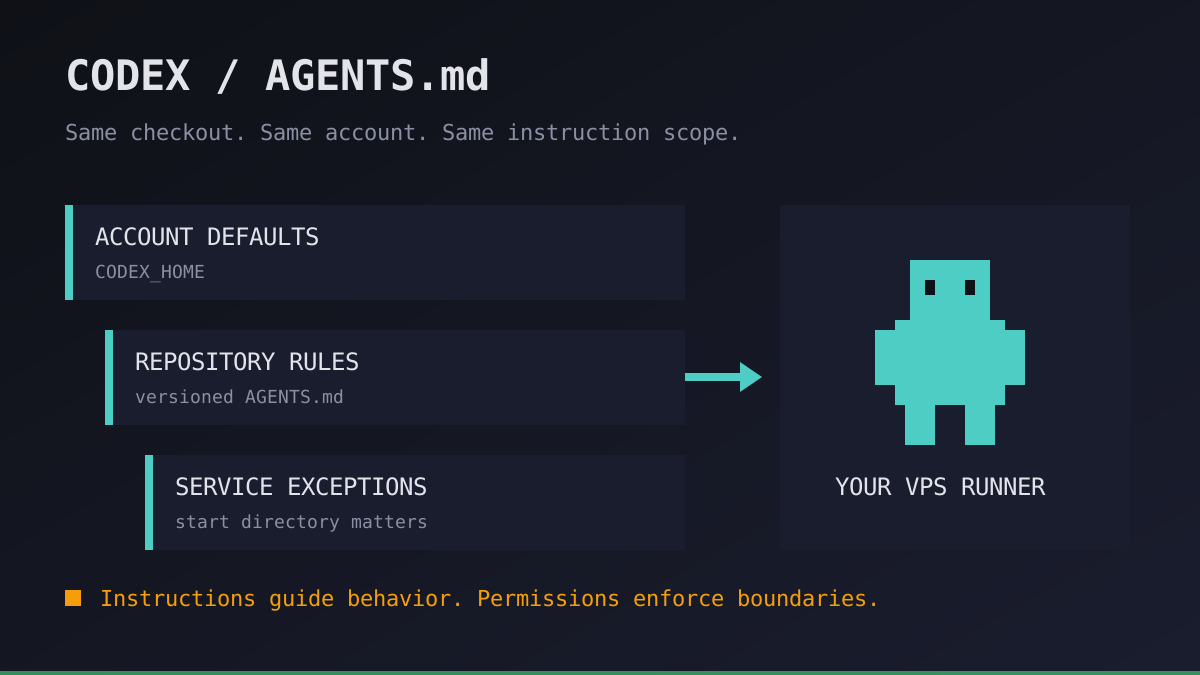
A Codex task behaves one way on our laptop and another way on the VPS. The repository is identical, but the agent starts in a different directory and inherits different account-level instructions. Repeating the prompt does not fix the environment.
We treat Codex AGENTS.md as versioned operating guidance, not a magic memory file. Here is how we make instruction scope reproducible before a remote agent works unattended. This is a manual Codex workflow, not a new Office Claws configuration feature.
Codex AGENTS.md: what loads on the runner
The official instruction guide describes a chain built at the start of a run. The starting directory matters; having a file somewhere in the checkout does not mean it enters that initial chain.
| Layer | Discovery | Operational consequence |
|---|---|---|
| Codex home | AGENTS.override.md, otherwise AGENTS.md; first nonempty file | The VPS account can add rules absent from your laptop |
| Project root to working directory | One file per directory: override, normal file, then configured fallback names | Starting inside a service loads a different chain from starting at the root |
| Combined guidance | Root-to-directory order; nearer instructions take precedence | A nested exception can change a broad default |
The default combined project-document limit is 32 KiB. Keep guidance short and check project_doc_max_bytes if it is truncated. An override replaces the normal file in the same directory; it does not erase every earlier layer. The default home is ~/.codex, but CODEX_HOME can point elsewhere.
Run your first agent in about 3 minutes
Install the Office Claws CLI, connect your Contabo account and Codex subscription, and your agent gets its own VPS and a desk in the office.
curl -fsSL https://officeclaws.com/downloads/install.sh | sh$4.99/mo + your own Contabo VPS · keys stay in your keychain
Write an instruction contract, not a repository manual
We keep stable, shared rules in the repository root and service-specific commands near the service. Do not paste the entire architecture wiki into the prompt budget. Name the relevant document and the decision it supports instead.
For a repository whose test command really is npm test, this is a small root-file template. Adapt commands to the actual project before committing it; the example creates no permissions or automation.
# AGENTS.md

## Scope
- Work only on the assigned branch and requested change.
- Read docs/development.md before changing build configuration.

## Verification
- Run npm test after code changes; report the command and result.
- If a check cannot run, report the blocker instead of claiming success.

## Review boundary
- Do not deploy, publish packages, or rotate credentials.
- Flag authentication and migration changes for human review.
Commit the instruction file like code. A change from “report a proposed migration” to “apply the migration” deserves review even when no application source changes. Keep tokens, passwords and private account details out of these files: repository instructions are content sent to the model, not a secret store.
Verify the same scope over SSH
On the VPS, use the same Unix account, checkout, working directory and Codex profile as the real task. A shell opened as an administrator is not evidence about a service account's configuration. Our SSH workflow guide covers the connection itself.
Run this read-only preflight from the trusted repository root. Replace the directory with your checkout. It lists candidate files, not proof that all of them load; compare the listing with the scope rules above and the agent's response. The last command uses model access and can consume plan allowance.
cd ~/work/product-api
pwd
git rev-parse HEAD
codex --version
printf 'CODEX_HOME=%s\n' "${CODEX_HOME:-$HOME/.codex}"
find . -type d -name .git -prune -o -type f \
  \( -name AGENTS.md -o -name AGENTS.override.md \) -print
codex exec --sandbox read-only \
  "Do not edit files or execute project commands. List the instruction sources you loaded and summarize the verification and review boundaries."
Inspect account-level files separately without copying their contents into shared logs. Also check configured fallback names: find above deliberately lists only the two standard names. A model's summary is a useful smoke test, not a formal audit of every instruction or a security guarantee.
If the task belongs inside a nested service, repeat the preflight from that directory. Start a new run after editing instruction files: the documented chain is assembled once per run, rather than hot-reloaded into an existing session.
Keep instructions separate from enforcement
An AGENTS.md sentence saying “do not deploy” is not an access-control mechanism. Restrict credentials and tool access independently, and use appropriate sandbox and approval settings. Never give an overnight runner production deployment credentials just because its instructions discourage using them.
Before starting an unattended job, we record the commit, Codex version, working directory and instruction-file revision. With parallel agents, verify each checkout rather than assuming that a file edited on one runner reached all the others. If behavior differs, check the account home, CODEX_HOME, overrides, fallback configuration and start directory before rewriting the task prompt.
Office Claws runs Codex agents on your own Contabo VPS and gives you CLI and pixel-art desktop control. You still maintain repository instructions and review the output. Office Claws starts at $4.99/month for the first agent; the VPS and supported ChatGPT plan are separate, and plan usage limits still apply. See Codex subscription costs.
Our recommendation: version one small instruction contract, verify it on the actual runner account, and retain a human review gate. An always-on machine should make the workflow repeatable—not make a text file look like a permission boundary.