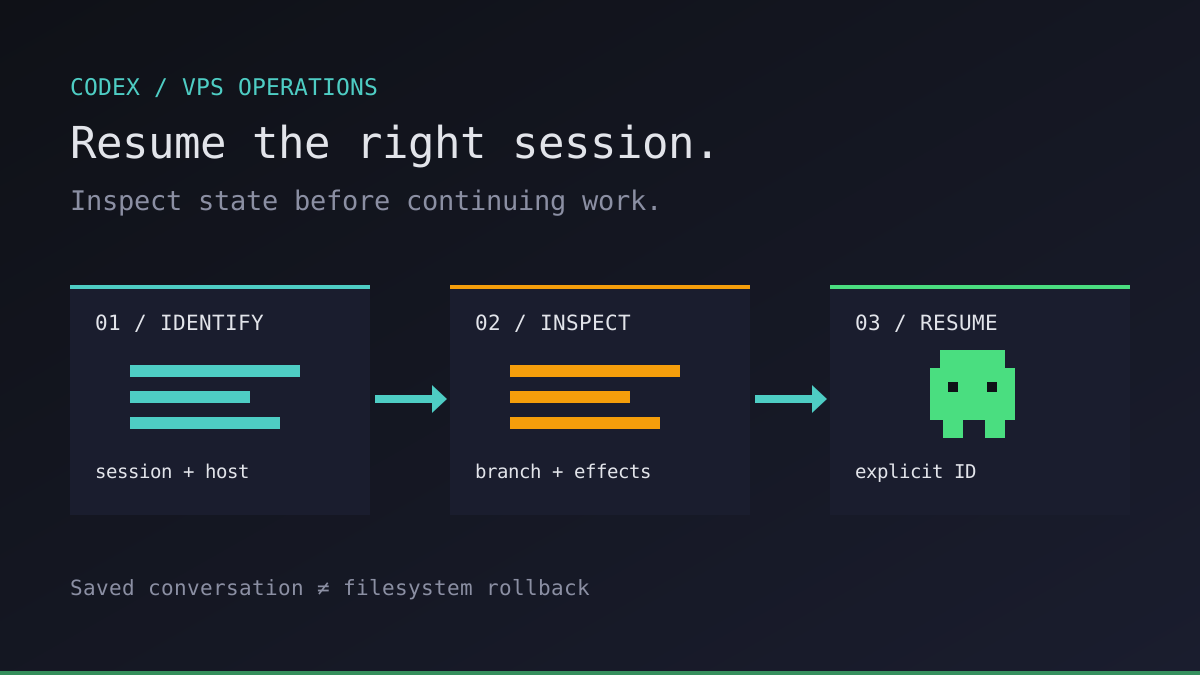
The SSH window disappears halfway through a refactor. Should we reconnect, resume Codex, or start over? Those are three different actions. Picking the wrong one can leave two agents editing the same branch or repeat an operation that already happened.
We use a Codex resume session workflow when a process has ended but its saved conversation is still available. This guide is about recovery identity and state checks, not keeping a process alive. For persistence, see our background task guide.
Codex resume session: reconnect is not resume
The official non-interactive documentation documents codex exec resume <SESSION_ID> for continuing a saved run. The interactive CLI also supports codex resume. Check codex resume --help and codex exec resume --help on the installed version before adopting a recovery procedure.
| Situation | First action | What not to assume |
|---|---|---|
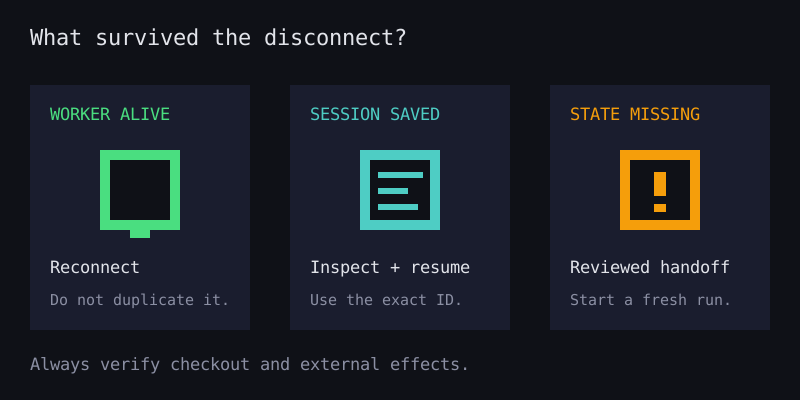
| SSH dropped; Codex is still running inside tmux | Reconnect to that existing tmux session | A disconnected terminal means the agent stopped |
| Codex process ended; saved session remains on the runner | Inspect state, then resume the chosen session | A conversation restores files or external side effects |
| VPS was replaced; session storage is missing | Recover the repository and task brief; start a new run | A Git clone contains Codex conversation history |
| Auth or plan allowance blocked the task | Resolve access or wait for allowance before continuing | Resuming bypasses authentication or usage limits |
A resumed conversation is not a VM snapshot, a filesystem rollback, or an exactly-once job mechanism. Files, background commands, Git operations and remote services have their own state. We inspect them before asking the model to continue.
Run your first agent in about 3 minutes
Install the Office Claws CLI, connect your Contabo account and Codex subscription, and your agent gets its own VPS and a desk in the office.
curl -fsSL https://officeclaws.com/downloads/install.sh | sh$4.99/mo + your own Contabo VPS · keys stay in your keychain
Record the session identity before you need it
On a VPS, use the same Unix account and Codex home as the original task. Codex normally stores local state under ~/.codex; CODEX_HOME can change that location. A different account or home can make an existing session appear to be missing. Runs started with --ephemeral do not persist session rollout files for later recovery.
For an interactive task, use codex resume to choose a saved session, or codex resume <SESSION_ID> when you already know its identity. In automated workflows, capture the thread_id from the thread.started event emitted by codex exec --json and record it alongside the host, working directory, branch and commit. Our structured output guide explains why this JSONL event stream is separate from the final result.
Avoid --last in a shared runner recovery script. The most recent session is not necessarily the task you intended, especially when multiple agents work under one account. An explicit session ID is a better recovery key; it is not an authorization boundary.
Keep session storage and event logs private. They can include prompts, source snippets and command output. Do not copy an entire Codex home into a ticket or artifact archive: it may also contain authentication material. Back up repository work and task records with appropriate access controls, separately from credentials.
Inspect the checkout, then continue one task
First reconnect to the host using your normal SSH workflow. If the original task used tmux, inspect its sessions with tmux ls and attach to the right one before launching anything new. Also check the process or service that owned the job. A shell disconnect alone is not evidence that the old worker is gone.
Once we have confirmed that the original worker has stopped, we inspect its checkout. This example only reads Git metadata and local help; replace the path with the original task directory.
cd ~/work/product-api
pwd
git branch --show-current
git rev-parse HEAD
git status --short
git diff --stat
git diff --cached --stat
codex --version
codex exec resume --help
Compare these results with the task record. Inspect the actual diff, untracked files, test artifacts and any external operations in the previous log. A clean working tree does not prove nothing happened: the agent might already have committed, pushed, or changed a remote system. Check those systems through a trusted read-only interface if they were in scope.
If the repository has moved to a different branch or commit, stop and reconcile it before resuming. Do not use git reset --hard or delete untracked files as a recovery shortcut. Preserve unfinished changes; if the original environment cannot be reconstructed confidently, start a fresh session with a reviewed handoff instead.
After inspection, this is an explicit non-interactive continuation. Replace the ID with the recorded value. It sends a new turn and can consume your Codex allowance. Reconfirm the effective sandbox, approval policy and connected tools for your installed version; the prompt below is guidance, not enforcement.
SESSION_ID='replace-with-recorded-session-id'
codex exec resume "$SESSION_ID" \
  "First summarize prior progress and compare it with the current checkout. Do not edit files, run project commands, push, deploy, or repeat external operations. Report discrepancies and propose the next verification step."
Review that response against the evidence before authorizing further edits. An agent's recollection is useful context, not proof that a test passed or a remote action completed. Keep deployment credentials out of the runner and enforce permissions independently; see sandbox and approvals.
Make recovery a handoff, not an automatic retry
We keep a small recovery record outside the checkout: task ID, host, Unix account, Codex home path, session ID, working directory, branch, base commit, last verified milestone and unresolved side effects. Store only the home path, never copied credential contents. After each reviewed milestone, update that record and preserve the relevant test output.
This is an operator-maintained workflow, not a claim that Office Claws ships transactional session recovery, automatic session migration or an idempotent retry engine. Office Claws provides a CLI and desktop control surface for Codex agents on your own Contabo VPS; local session retention, backups and recovery checks remain your responsibility.
The VPS can stay available 24/7 without promising that a task runs forever. Office Claws starts at $4.99/month for the first agent; the VPS is separate, and supported ChatGPT-plan access to Codex remains subject to usage limits. Resuming does not reset those limits or make retained context free. See subscription vs API cost for the separate cost layers.
Our recommendation: rehearse one harmless interrupted task before relying on overnight recovery. Know where its session lives, prove the old worker has stopped, compare the checkout with the task record, and resume by explicit ID. A reliable recovery starts with evidence, not another retry loop.