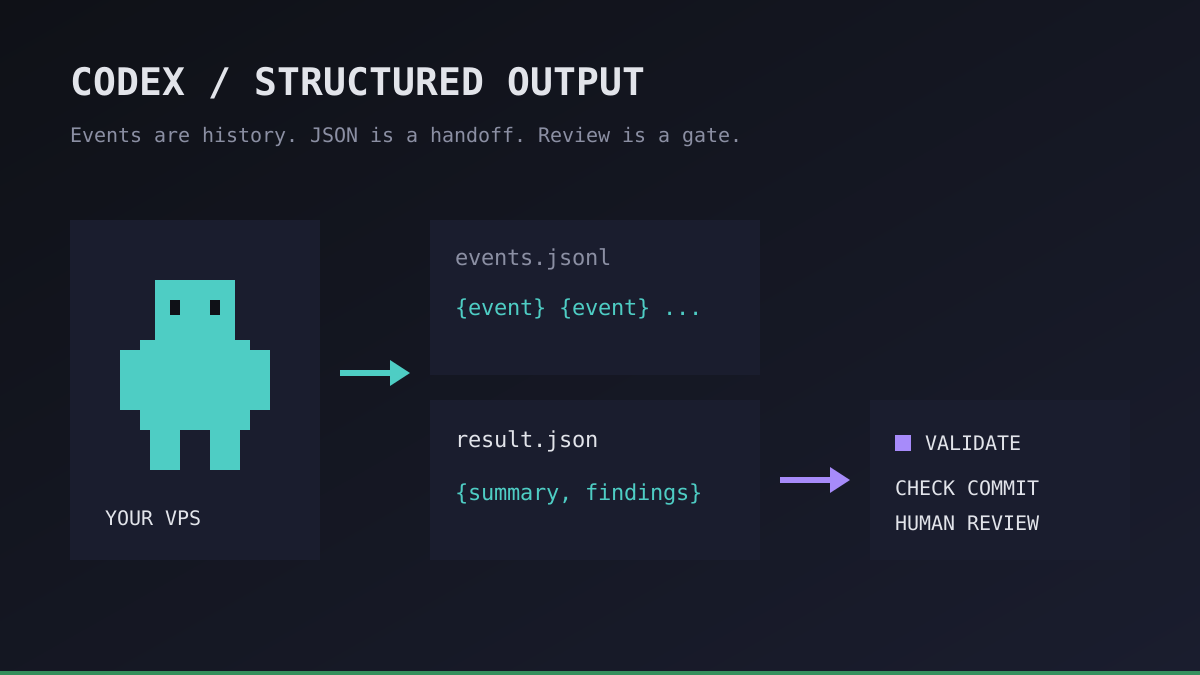
An overnight agent finishes with a cheerful paragraph. Your next script needs to know whether to queue a review, stop for missing credentials, or retry a failed job. Parsing the word “success” out of that paragraph is not a handoff contract.
We use Codex structured output to separate a readable conversation from a machine-readable result. This guide covers that result boundary, not how to keep a process alive: start with our background task guide for process persistence.
Codex structured output: events are not the final result
The official non-interactive guide documents three different output mechanisms. They solve different problems:
| Mechanism | What it contains | Where we use it |
|---|---|---|
--json | A JSONL stream of execution events | Diagnostics and activity history |
--output-schema | A JSON Schema contract for the final response | Stable fields for a downstream consumer |
-o | The final agent message written to a file | A separate handoff artifact |
A JSONL file is many JSON objects, one per line. It is not the same thing as one final JSON document. Do not feed the entire event log to a consumer that expects a single result object.
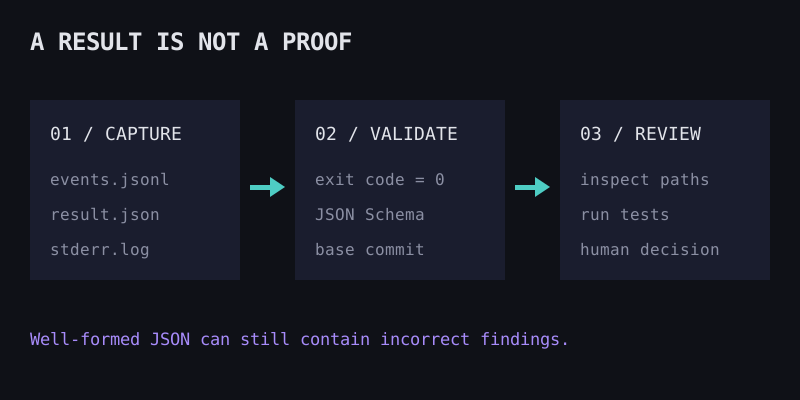
The schema constrains the response shape, not the truth of its contents. An agent can return valid JSON and still misunderstand a test failure. Keep that distinction in every downstream decision.
Run your first agent in about 3 minutes
Install the Office Claws CLI, connect your Contabo account and Codex subscription, and your agent gets its own VPS and a desk in the office.
curl -fsSL https://officeclaws.com/downloads/install.sh | sh$4.99/mo + your own Contabo VPS · keys stay in your keychain
Build a small read-only handoff on your VPS
Use a trusted Git checkout on your own runner, with Codex already authenticated. Check codex exec --help against your installed version before adopting the example. This is a manual shell recipe, not a built-in Office Claws job scheduler.
Create an artifact directory outside the checkout so generated logs do not become repository input. The schema uses a deliberately small vocabulary: a summary, findings, and suggested checks. It does not ask the agent to certify its own work as safe.
cd ~/work/product-api
umask 077
RUN_DIR=$(mktemp -d "$HOME/codex-report.XXXXXX")
cat > "$RUN_DIR/schema.json" <<'JSON'
{
  "type": "object",
  "properties": {
    "summary": { "type": "string" },
    "findings": {
      "type": "array",
      "items": { "type": "string" }
    },
    "suggested_checks": {
      "type": "array",
      "items": { "type": "string" }
    }
  },
  "required": ["summary", "findings", "suggested_checks"],
  "additionalProperties": false
}
JSON

git rev-parse HEAD > "$RUN_DIR/base-commit.txt"
codex --version > "$RUN_DIR/codex-version.txt"
if codex exec --sandbox read-only --json \
  --output-schema "$RUN_DIR/schema.json" \
  -o "$RUN_DIR/result.json" \
  "Inspect the repository for risky retry logic. Do not edit files. Report findings with file paths; suggest checks without running them." \
  > "$RUN_DIR/events.jsonl" 2> "$RUN_DIR/stderr.log"; then
  printf '0\n' > "$RUN_DIR/exit-code.txt"
else
  rc=$?
  printf '%s\n' "$rc" > "$RUN_DIR/exit-code.txt"
fi
printf 'Artifacts: %s\n' "$RUN_DIR"
The read-only sandbox limits writes; it is not a confidentiality boundary. Only run on code the authenticated account may access, remove unnecessary credentials from the environment, and review project configuration and connected tools before execution. Never put authentication files into the artifact bundle.
The explicit exit-code file matters because a supervisor must distinguish a failed process from a successful process with findings. If you use a timeout or service manager, record its termination state too. Persistent hosting does not guarantee that Codex completed a turn.
Validate the artifact before you queue a review
Our downstream contract requires all of the following, not just a parsable file:
- The recorded process exit code is zero. A missing or nonzero code is a failed or incomplete run.
result.jsonexists, is nonempty, and validates against the same schema using a JSON Schema validator. JSON syntax checks alone are insufficient.- The stored base commit matches the checkout being reviewed. A result from yesterday's checkout is stale evidence for today's branch.
- A reviewer checks the cited paths and runs the relevant tests independently before acting on the findings.
Treat strings inside JSON as untrusted text. Never interpolate suggested_checks into a shell, and never turn a model-provided path into an unrestricted file read. Use allowlisted commands and repository-scoped paths if you later build automation around this recipe.
| Failure | Safe next action |
|---|---|
| Missing result or invalid schema | Preserve logs; mark the attempt incomplete |
| Auth or usage-limit error | Pause for operator action; avoid a tight retry loop |
| Valid JSON, weak or incorrect findings | Ask for review; do not equate formatting with correctness |
| Process interrupted after making external changes | Inspect actual state before any retry |
Even though this example is read-only, future write-capable jobs need more care. Retrying an agent is not an idempotent operation: a prior attempt may already have modified files or invoked an external tool. Use a new run directory for every attempt, retain the previous evidence, and inspect the branch before resuming. Our monitoring guide covers the wider health signals.
Put the contract around an always-on agent
Office Claws gives Codex agents a home on your own Contabo VPS and a CLI or pixel-art desktop control surface. The schema validation and artifact handling above are your own scripts, not a claim that Office Claws ships a JSON workflow engine. You still own retention, access controls, updates, and the final review gate.
The cost layers remain separate: Office Claws starts at $4.99/month for the first agent, the VPS is paid separately, and your supported ChatGPT plan supplies Codex access within its usage limits. An always-on server does not mean unlimited model usage. See subscription vs API cost before sizing a queue.
Our recommendation: start with one read-only report on one runner. Keep events, final JSON, exit status, and commit identity together. Only add parallel consumers after the single-run contract is reliable; the multiple Codex agents guide explains how to separate their workspaces.