The same Codex prompt can behave differently over SSH and in a scheduled job. Before rewriting the prompt, check the account, working directory and configuration layers. A familiar profile name does not prove that two runners loaded the same settings.
We use Codex config profiles to name a small set of repeatable defaults, not to create a new security boundary. This guide covers the current profile-file format, the overrides that still win, and a rollout checklist for a VPS that stays available after the laptop closes.
Codex config profiles: one file per launch preset
According to OpenAI's advanced configuration documentation, current Codex loads the base user configuration and overlays a separate file selected with --profile. With the default Codex home, the pair is ~/.codex/config.toml and ~/.codex/vps-report.config.toml for a profile named vps-report.
The version matters. Since Codex 0.134.0, --profile no longer reads legacy [profiles.<name>] tables inside config.toml; the top-level profile = "name" selector is also no longer supported. Move each legacy table's settings into its own <name>.config.toml file as top-level keys. Update the launcher to pass --profile name, verify the migration, then remove the obsolete table and selector. Do not change every runner during the first test.
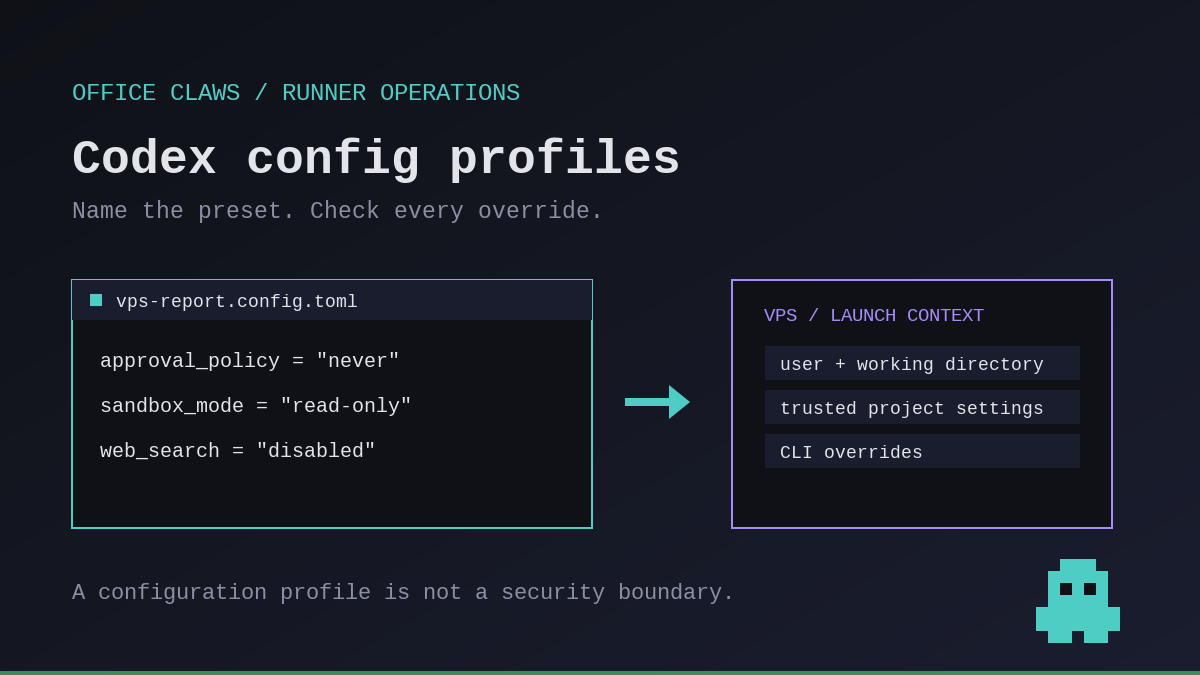
Start with a narrowly scoped reporting preset. Save the following as ~/.codex/vps-report.config.toml on the executing host, under the account that will run the job:
approval_policy = "never"
sandbox_mode = "read-only"
web_search = "disabled"
These are defaults for a reporting task, not a universal configuration. never means no interactive approval requests; it does not make denied operations succeed. We omit a model so the example does not assume access to a particular one. Select an available model explicitly if your job needs a fixed choice.
A configuration profile is not the same thing as a named permission profile, which uses the separate permissions configuration system. Nor is it an account switch, subscription, scheduler or isolated copy of the runner's home. See our sandbox and approvals guide before choosing execution permissions.
Run your first agent in about 3 minutes
Install the Office Claws CLI, connect your Contabo account and Codex subscription, and your agent gets its own VPS and a desk in the office.
curl -fsSL https://officeclaws.com/downloads/install.sh | sh$4.99/mo + your own Contabo VPS · keys stay in your keychain
Follow precedence before blaming the profile
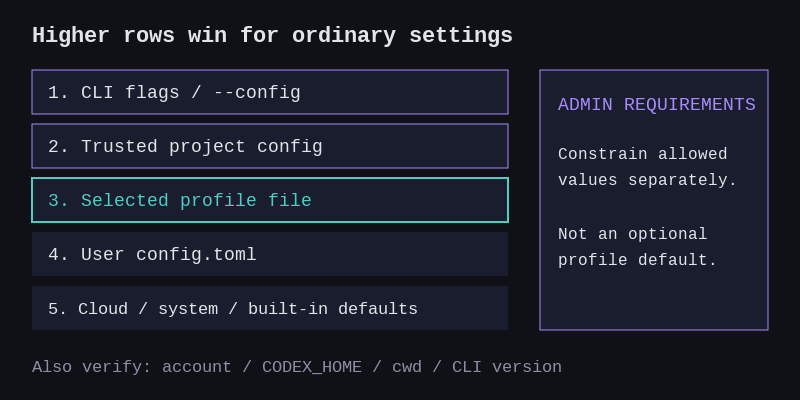
OpenAI's configuration basics document the following order. Higher rows win for ordinary setting values; enforced administrator requirements constrain what is allowed separately.
| Priority | Layer | Runner consequence |
|---|---|---|
| Highest | CLI flags and --config overrides | A launcher can override the selected preset |
| Next | Trusted project .codex/config.toml files | The closest applicable directory wins |
| Next | Selected <name>.config.toml profile | Overrides base user defaults, not project settings |
| Next | User config.toml | Shared defaults still apply when absent from the profile |
| Lower | Cloud-managed defaults, system configuration, built-ins | Remain relevant where higher layers do not set a value |
A profile called vps-report therefore does not guarantee read-only execution. A trusted repository or a CLI override can change a supported setting. An administrator's enforced requirements are not merely another optional default that the profile can bypass.
Project layers load only for trusted projects. Do not mark an unfamiliar checkout trusted merely to silence a configuration warning: inspect its configuration, hooks and instructions first. User-level hooks and other inherited integrations remain a separate consideration even when project configuration is skipped.
Paths also belong to the machine doing the work. Editing a laptop profile does not update the VPS. Codex normally keeps state in ~/.codex, but CODEX_HOME can change the home. A service running as another Unix user can find different configuration, credentials and history. Our SSH workflow guide explains that connection boundary.
Test the actual launcher, not just an SSH shell
Use a disposable, reviewed fixture repository without production credentials. Run the smoke test as the intended unprivileged runner account, with the same environment and working directory that the future scheduler will use. Substitute your own fixture path:
codex --version
printf 'CODEX_HOME=%s\n' "${CODEX_HOME:-$HOME/.codex}"
cd /srv/codex/fixtures/profile-check
pwd
codex exec --profile vps-report \
  "Read README.md and summarize it. Do not modify files or call external tools."
This example launches one foreground task; it does not install a timer or guarantee persistence after disconnect. The prompt is not enforcement. Inspect command evidence and the fixture afterward, and separately test that a harmless attempted write is denied. Keep the fixture free of secrets: read-only does not mean confidential files become invisible.
Our acceptance checklist is short:
- Confirm the installed CLI supports the documented profile format and flags; inspect local
--helpwhen versions differ. - Check the launcher's full argument list, including wrapper-added flags. Record the working directory, account, profile name and approved configuration revision.
- Review applicable project configuration and administrator constraints. In an interactive session with the same inputs, use
/statusto inspect reported settings; do not treat the model's own description as proof. - Check inherited MCP connections and hooks independently. Disabling web search is not a network firewall or a switch that disables every external integration.
- Keep the task's exit status and report. An unavailable model, invalid configuration or denied action is a failed or blocked run, not permission to retry with broader access.
Retain reviewed configuration revisions without tokens. Do not publish entire config.toml files, environment dumps or auth.json as debugging evidence; configuration can contain private endpoints or credentials. Compare redacted settings deliberately rather than copying a whole Codex home between machines.
Roll out one preset without inventing a policy engine
We start with one runner and one bounded report, then repeat the fixture checks after a CLI upgrade, profile edit or launcher change. A profile reduces repeated flags; it does not pin repository instructions, installed tools, every model response or the full host environment. Keep a separately authorized human decision for merging or deployment.
Office Claws provides desktop and CLI management for Codex agents on your own Contabo VPS, with private connectivity through Tailscale. The profile files and verification steps here are operator-maintained Codex configuration, not a claim that Office Claws automatically synchronizes presets or enforces fleet-wide policy.
A server can remain available 24/7 without providing unlimited model usage. Office Claws starts at $4.99/month for the first agent; VPS charges are separate, and supported ChatGPT-plan access remains subject to its allowances. Our subscription cost guide separates those bills.
Our recommendation: name the preset, review every layer above it, and verify the exact launch path before scheduling real work. Start with Codex on a VPS for the host setup, then add structured output when another process must consume the report.