What "Codex Subscription" Actually Means
There is no separate product called a Codex subscription. Codex comes bundled with your ChatGPT plan. You sign in to the Codex CLI, the IDE extension, the desktop app or Codex on the web with your ChatGPT account, and your usage is drawn from the allowance that plan includes. The alternative is to sign in with an OpenAI API key and pay per token.
So the real questions are: which ChatGPT plan, how far does its allowance go, and when should you skip the plan and use the API instead. We run Codex agents around the clock on Office Claws, so this is the version of the answer we wish we had found when we started.
Run your first agent in about 3 minutes
Install the Office Claws CLI, connect your Contabo account and Codex subscription, and your agent gets its own VPS and a desk in the office.
curl -fsSL https://officeclaws.com/downloads/install.sh | sh$4.99/mo + your own Contabo VPS · keys stay in your keychain
Which ChatGPT Plans Include Codex
Prices below are OpenAI's list prices in USD as of October 2026, taken from the official Codex pricing page. OpenAI changes plans and allowances often, so check that page before you buy.
| Plan | Price (as of Oct 2026) | What you get for Codex |
|---|---|---|
| Free | $0 | Codex for quick coding tasks, to try it out |
| Go | $8/mo | Codex for lightweight coding tasks |
| Plus | $20/mo | Codex on web, CLI, IDE extension and iOS — "a few focused coding sessions each week" |
| Pro | from $100/mo (tiers at $100, $200 and $500) | Much larger allowance; Pro currently has no five-hour limit |
| Business | $20/user/mo billed annually (2+ users), $25/user/mo billed monthly | Plus-level usage per standard seat, plus workspace admin |
| Enterprise & Edu | Contact sales | Organization-wide Codex; flexible pricing is credit-based |
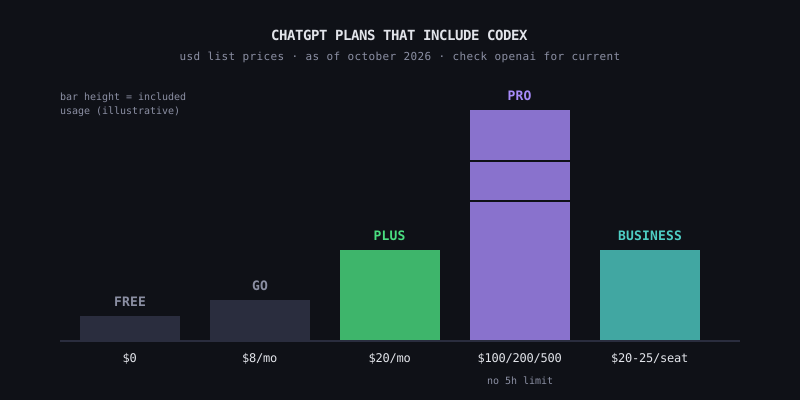
Two details matter more than the price column:
- Cloud tasks are not on every plan. OpenAI's help center lists Codex cloud for eligible Plus, Pro, Business, Enterprise and Edu accounts, not for Free or Go. Local work in the CLI and IDE extension is what the cheap tiers cover.
- Pro is now three tiers, not one. The $500 tier has the highest allowance. If you remember Pro as a single $200 plan, that is out of date.
For a single developer who codes with Codex most days, Plus is the starting point and Pro $100 is the first upgrade. Free and Go are for evaluating Codex, not for running an agent.
How Codex Usage Limits Work in Practice
OpenAI does not sell Codex by the token on these plans. It sells an allowance, measured over two windows:
- A five-hour window. On Plus and standard Business seats you get a rolling budget of messages per five hours. Run out and Codex stops until the window resets.
- A weekly window. On top of that, weekly limits may apply. Both windows need headroom for a request to go through.
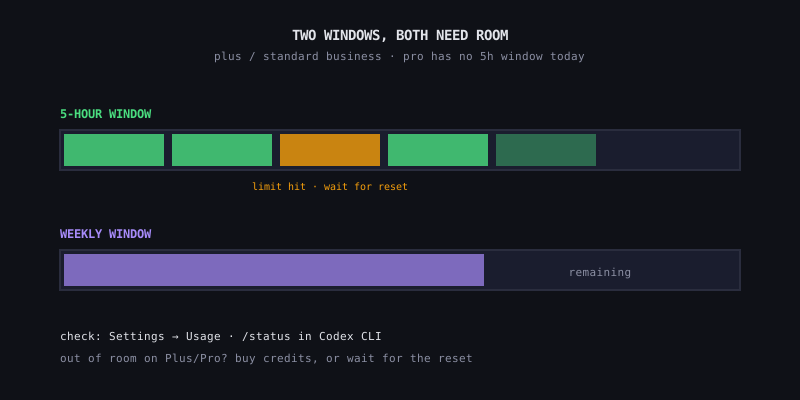
OpenAI publishes estimated message ranges per model on the pricing page, but treats them as estimates, not guarantees, and the ranges are wide. In our experience, three things move how fast you burn through the allowance:
- Model choice. The largest reasoning models eat the allowance many times faster than the small fast ones. Pick a smaller model for routine edits and save the big one for hard problems
- Task size. An agent that reads thirty files and reruns the test suite after every patch costs far more per "message" than a quick question
- Local vs cloud. Cloud tasks can use more of the allowance than local messages. A CLI agent on your own machine or VPS is the cheaper way to spend it
To see where you stand, open Settings → Usage in ChatGPT, or type /status inside a running Codex CLI session. When you hit the limit on Plus or Pro, you can buy additional credits instead of upgrading. Your included usage is spent first, then credits.
# inside a Codex CLI session
/status
One rule we learned the hard way: every agent signed in to the same ChatGPT account draws from the same allowance. Three agents on one Plus plan do not get three allowances — they share one, and hit the five-hour wall three times as fast.
Subscription or API: The Short Version
You can also run Codex with an API key. Then there is no five-hour window, and you pay standard API rates for every input and output token. OpenAI's docs note two trade-offs: API-key usage is billed separately from any ChatGPT plan, and some features that rely on ChatGPT — Codex cloud among them — are unavailable with an API key.
| ChatGPT plan | OpenAI API key | |
|---|---|---|
| Bill shape | Flat monthly | Pay per token |
| Limit | Five-hour + weekly allowance | Your API rate limits and budget |
| Overage | Wait, or buy credits | Billed immediately |
| Codex cloud | Plus and above | Not available |
| Best for | One developer, daily coding work | CI jobs, batch work, per-project cost allocation |
For most solo developers coding every day, the subscription is the cheaper bill by a wide margin. We did the full token math — light, focused and heavy coding days, and where the break-even sits — in Codex Subscription vs API: Which Bill Actually Costs Less, so we will not repeat it here.
Running Codex 24/7 on Your Subscription
The catch with the subscription path is where Codex runs. Out of the box it runs on your laptop. Close the lid and the agent stops; switch Wi-Fi and the session drops. That is fine for pair-programming, but not for an agent you want working overnight.
The fix is to move Codex to a small always-on Linux VPS and keep signing in with your ChatGPT plan. OpenAI supports that setup: on headless machines, codex login --device-auth lets you sign in from your phone or laptop browser with a one-time code (device code login must be enabled in your ChatGPT security settings first).
# on the VPS
codex login --device-auth
codex login status
That is what Office Claws does for you. For $4.99/month, we set up a fresh Ubuntu VPS from your own Contabo account: install Codex CLI, put it on your Tailscale network and connect it to your ChatGPT plan with officeclaws connect-codex. You pay Contabo directly for the server — a small one costs a few euros a month — and you bring your own ChatGPT plan. Codex on a ChatGPT plan is the supported path.
| Cost line | Who you pay | Typical amount |
|---|---|---|
| ChatGPT plan (Plus or Pro) | OpenAI | $20 or from $100/mo |
| VPS | Contabo | A few euros/mo |
| Office Claws Self-Hosted | Office Claws | $4.99/mo |
To get the most out of one subscription:
- Match agents to your plan. One busy agent fits Plus. Several agents running all day belong on Pro, which currently has no five-hour limit. See How to Run Multiple Codex Agents for the isolation setup
- Plan for resets in long jobs. An overnight task on Plus can hit the five-hour window mid-run. Checkpoint progress and resume rather than restarting — the patterns are in Long-Running Codex Tasks
- Use the smallest model that does the job. It is the biggest single lever on how long your allowance lasts
Which Plan Should You Pick
- Trying Codex out: Free or Go. Enough to judge it, not enough to run an agent
- One developer, one agent: Plus at $20. Watch
/statusfor a week before deciding anything else - Hitting the five-hour wall every day, or running several agents: Pro $100, then $200 or $500 if you still run out
- A team: Business, so seats, billing and admin live in one workspace
- Automation with no human in the loop, or per-project billing: an API key
Whichever you choose, the plan only pays off if Codex is actually working. Put it on a VPS so it keeps going when your laptop does not.
Related Reading
- Codex Subscription vs API: Which Bill Actually Costs Less — the full token math and break-even
- How to Run Multiple Codex Agents — isolation patterns for several agents
- Long-Running Codex Tasks — keeping an agent working while you sleep