Why OpenClaw Users Outgrow Tmux
Tmux is excellent for keeping a shell alive. It is not an operations layer for autonomous coding agents. Once an OpenClaw-style workflow has several long-running jobs, SSH windows and named panes stop answering the important questions: who owns this task, which branch is safe to review, what secrets were exposed, and can anyone recover the run if the laptop disconnects?
Office Claws is not a native OpenClaw runtime. The honest fit is as a desktop and VPS manager for OpenClaw-adjacent work: launch a scoped Codex-backed runner, keep the logs visible, isolate the checkout, and require a human gate before merge. If you are choosing the runtime first, start with OpenClaw vs Codex; if you need the control surface, see the OpenClaw desktop manager.
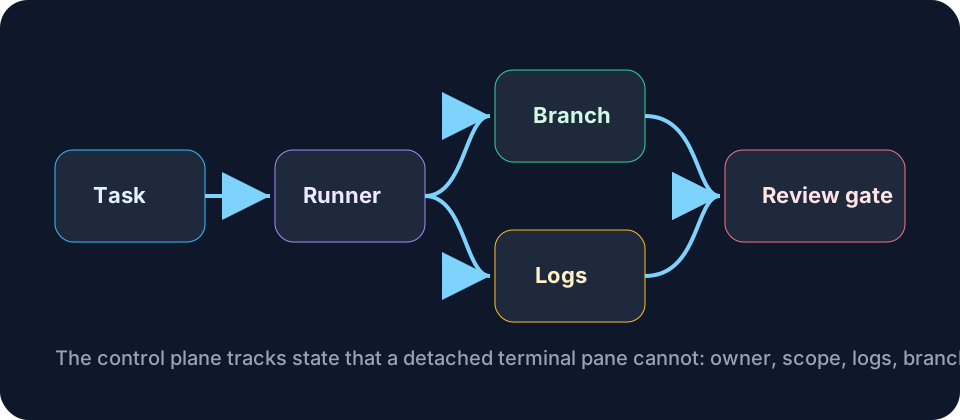
Tmux Keeps Processes Alive; Teams Need State
The common tmux pattern is simple: SSH into a VPS, start a session, run the agent, detach, and come back later. That works until the team needs shared visibility. A pane name is not a task record. Scrollback is not an audit log. A long-lived shell with a broad token is not a security boundary.
A better OpenClaw tmux alternative keeps the useful durability but adds operational state around it.
| Need | Tmux habit | Office Claws-style alternative |
|---|---|---|
| Long run survives disconnects | Detached pane | Managed runner with heartbeat and status |
| Know what changed | Check shell history and git diff manually | One task, one branch, visible diff |
| Share progress | Ask someone to SSH in | Log stream and task state visible from desktop |
| Recover stuck work | Reattach and inspect | Restart, stop, or replace the runner deliberately |
| Limit blast radius | Trust the shell user | Isolated workspace and scoped credentials |
Tmux can remain a useful emergency tool. It should not be the source of truth for production agent work.
The Replacement Pattern: One Task, One Runner, One Branch
The safest model is boring: every agent receives a narrow task, runs in one isolated workspace, pushes one branch, and stops at review. The runner can be local or on a VPS, but it should have a visible owner and a clear definition of done.
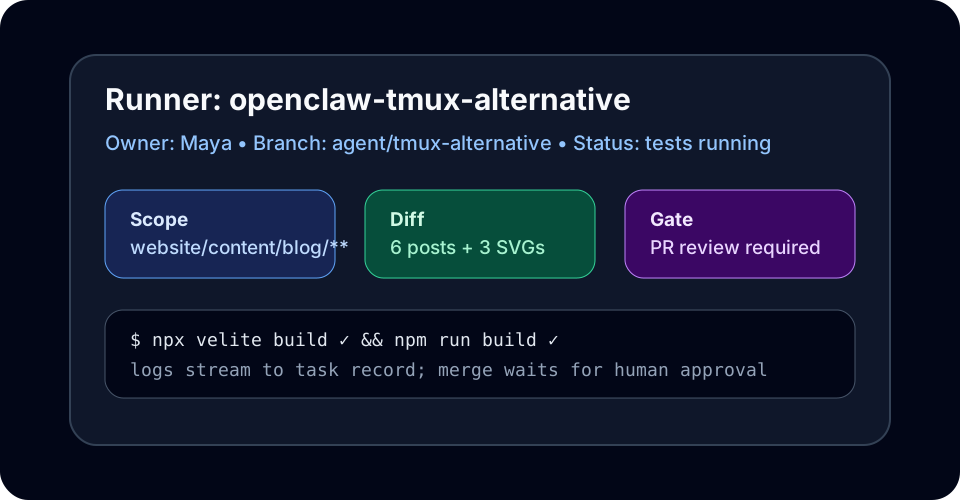
For OpenClaw users, this turns hidden terminal activity into something teammates can reason about. A developer should be able to open the task card and answer:
- What is the agent allowed to change?
- Which branch contains the work?
- Are logs still moving?
- Did tests run in the same environment that produced the diff?
- Is a person required before merge?
That is the practical difference between a durable terminal and a durable workflow.
Security: The Pane Is Not the Boundary
A tmux session often inherits whatever the SSH user can access: broad git remotes, environment variables, package registries, cloud CLIs, and sometimes production credentials. OpenClaw-style agents make that risky because the process is both long-running and capable of editing code.
Use the security baseline from OpenClaw security best practices: scoped tokens, per-task worktrees, explicit approvals for sensitive commands, and no shared .env sprawl. Pair it with OpenClaw sandbox when you need stronger isolation between tasks.
A safer setup gives the agent only what the task needs:
- read/write access to a single checkout or worktree;
- a branch naming convention that makes ownership obvious;
- short-lived or scoped tokens instead of shared personal credentials;
- logs that survive disconnects without exposing secrets to everyone;
- a stop rule for auth, billing, deploy, or data-access changes.
When Tmux Is Still Fine
Do not overbuild everything. Tmux is still fine for a quick manual fix, a one-off package install, or an exploratory debugging session where one human is watching. It becomes the wrong abstraction when the work is autonomous, long-running, reviewed by someone else, or repeated across many VPS runners.
The moment you ask “which pane has the real run?” or “did anyone check that branch?” you need a workflow manager, not another terminal tab.
A Simple Migration Plan
You can move from tmux to a managed OpenClaw-style workflow gradually:
- Keep using the same VPS, but create one checkout per task.
- Require a branch name before the agent starts.
- Move secrets out of shell profiles and into scoped task credentials.
- Save logs per task, not per terminal session.
- Add a human review gate before merge or deployment.
- Use Office Claws for OpenClaw users as the desktop control layer for runners, status, and Codex-backed execution.
If your agents already run remotely, read OpenClaw remote SSH workflow next. If you are planning a cleaner VPS architecture, pair this with OpenClaw on VPS.
Bottom Line
Tmux is a terminal durability tool. OpenClaw-style agent work needs operational durability: ownership, isolation, logs, branches, recovery, and review gates. Office Claws gives developers a practical tmux alternative for managing Codex-backed runners without pretending the terminal pane is a workflow system.