Why OpenClaw Usage Tracking Matters
OpenClaw-style agents are easy to launch and hard to manage if usage is invisible. A single task can consume model tokens, VPS hours, CI minutes, reviewer time, and risky credentials. Usage tracking gives every run an owner, a budget, and a reviewable result instead of treating autonomous coding like terminal noise.
Office Claws is not a native OpenClaw runtime. The honest fit is operations: a local desktop manager, isolated VPS runners, and Codex-backed agents for teams that want OpenClaw-adjacent workflows with clearer cost and control. If you are still choosing the runtime, start with OpenClaw vs Codex, then use this guide to measure the work you actually run.

The Usage Ledger Every Team Needs
Track usage at the task level, not only on the provider invoice. The invoice tells you what you paid. The task ledger tells you whether the spend produced a useful branch.
| Signal | Why it matters | Healthy default |
|---|---|---|
| Owner | Someone can stop, approve, or rerun the task | Every run has one human owner |
| Runner | Costs and logs map to a real machine | One task per runner or worktree |
| Branch | Review has a concrete artifact | Branch name includes task intent |
| Model/time budget | Spend is bounded before launch | Budget set before the first prompt |
| Diff size | Human review cost stays visible | Alert when diff grows beyond scope |
| Tests and CI | Success is evidence, not vibes | Build command stored with result |
This is where Office Claws for OpenClaw users is useful: the desktop view can show the owner, branch, runner, elapsed time, and latest log without forcing everyone to SSH into hidden panes.
A Practical Event Format
Usage tracking works best when each agent emits small structured events. They do not need to be fancy; they need to be consistent.
{"task":"fix-import-timeout","runner":"vps-fra-03","branch":"agent/fix-import-timeout","model":"codex-medium","state":"running","started_at":"2026-07-15T10:00:00Z","elapsed_minutes":42,"changed_files":5,"tests":"npm run build pending"}Keep secrets out of the event stream. Store provider keys locally, use scoped tokens on runners, and treat usage telemetry as operational metadata. For the security layer, pair this guide with OpenClaw security best practices.
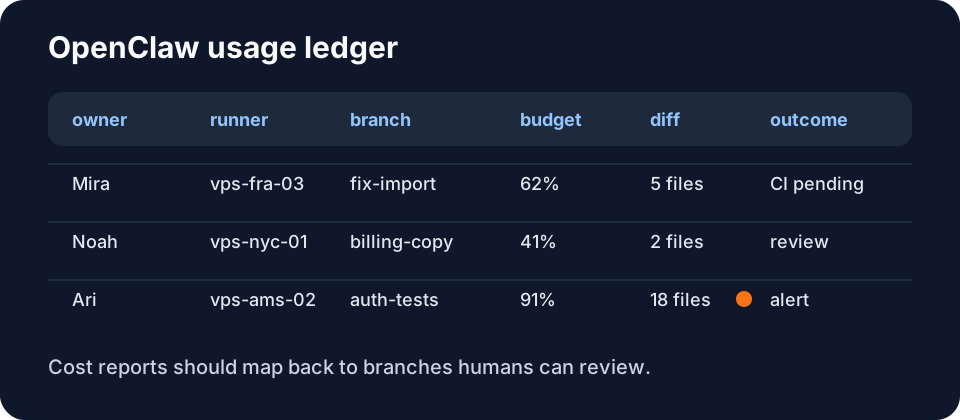
What to Measure Before You Optimize
Do not optimize tokens in isolation. The cheapest run is not always the best run if it creates a huge diff nobody trusts. Measure the full loop:
- Launch volume. How many agents started per day, per repo, per person?
- Time to first useful output. Did the runner inspect the right files or wander?
- Token and model spend. Which tasks needed escalation, and which should have stayed small?
- Runner cost. VPS uptime, idle time, CI retries, and artifact storage.
- Review outcome. Merged, closed, rerun, reverted, or split into a smaller task.
- Security exceptions. Any access to secrets, deploy paths, or broad credentials.
The strongest metric is cost per merged, reviewed change. That connects OpenClaw cost comparison to the daily reality of branches, CI, and human trust.
Usage Alerts That Prevent Waste
Good alerts fire while a human can still make a decision:
- No meaningful log output for ten minutes.
- Elapsed time exceeds the task budget.
- Diff touches secrets, deploy scripts, billing, or auth paths.
- The same test fails three times.
- The runner keeps editing after reporting success.
- Multiple agents modify the same files without an owner decision.
For teams, send the alert to the issue or PR thread. For solo operators, a desktop badge is enough. The important part is correlation: one task, one branch, one runner, one cost trail. OpenClaw monitoring covers the live health view; usage tracking turns that view into decisions over time.
Recommended Office Claws Setup
Start each OpenClaw-style task with an owner, branch, budget, model tier, runner, and acceptance command. Stream logs to the desktop, record state changes, checkpoint long tasks, and review usage by branch before launching more agents. Office Claws can sit in the operator role for OpenClaw-adjacent and Codex-backed work: local control, VPS visibility, safer key handling, and cost reporting that maps to the work your team reviews.
Related Reading
- OpenClaw vs Codex — compare runtime and operating tradeoffs.
- OpenClaw Desktop Manager — manage OpenClaw-style runners locally.
- OpenClaw Monitoring — detect stuck and wasteful agents.
- OpenClaw Token Optimization — reduce spend without blinding agents.