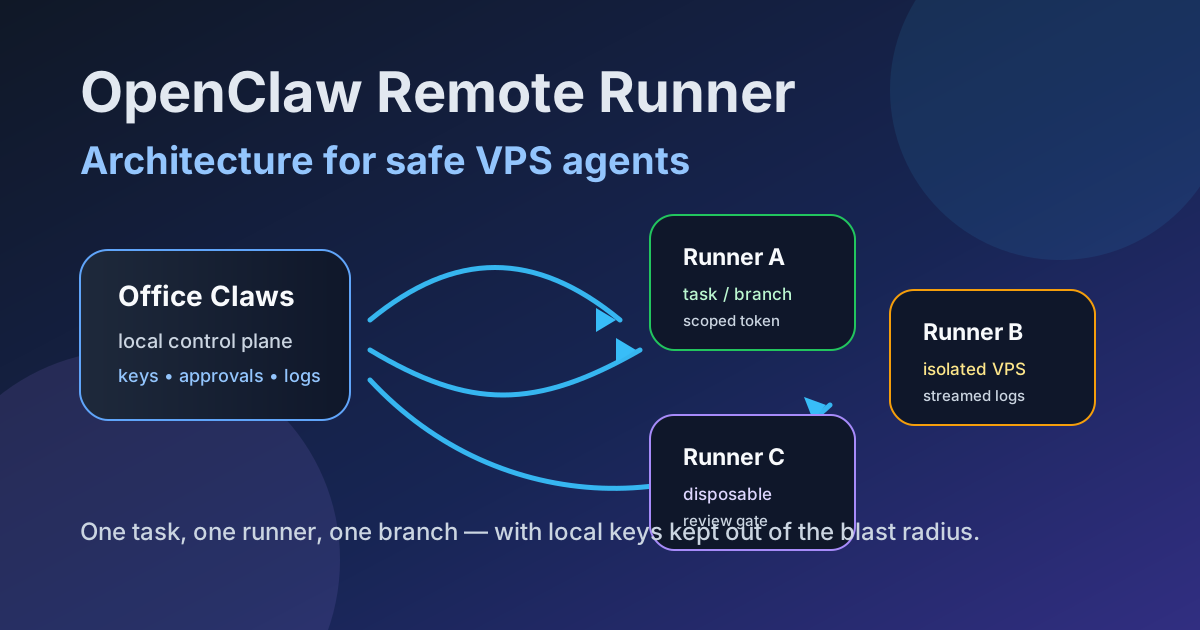
Why OpenClaw Remote Runner Architecture Matters
OpenClaw-style work becomes more valuable when agents can keep running after the laptop closes, but the architecture matters. A remote runner is not just “SSH into a box and leave a terminal open.” It is a disposable workspace with a branch, scoped credentials, logs, health checks, and a review gate.
Office Claws is not a native OpenClaw runtime. The honest pattern is to use Office Claws as the desktop control layer for OpenClaw-adjacent operations: provision and monitor VPS runners, keep long-lived keys local, and use Codex-backed execution where that is the practical runtime. If you are still choosing the runtime, start with OpenClaw vs Codex and the OpenClaw desktop manager guide.
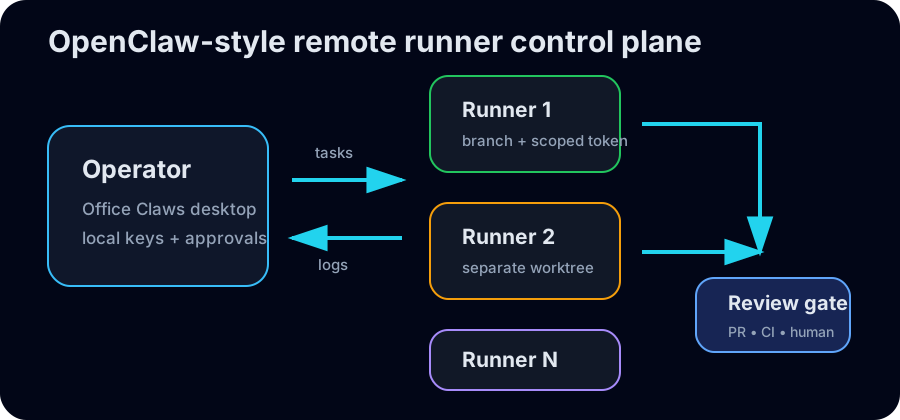
The OpenClaw Remote Runner Shape
A safe remote runner architecture has five parts: a local control plane, a runner host, an isolated checkout, a credential boundary, and a review gate. Keep those parts separate and recovery becomes boring.
| Layer | Job | Failure if missing |
|---|---|---|
| Local control plane | starts tasks, stores keys, shows status | secrets drift into every VPS shell |
| Runner host | gives agents CPU, network, and durable uptime | laptop sleep kills long work |
| Isolated checkout | one task, one branch, one worktree | agents overwrite each other |
| Credential boundary | short-lived repo token or brokered access | one prompt injection becomes org access |
| Review gate | PR, CI, human approval | generated code reaches production too early |
The goal is not maximum automation. The goal is controlled autonomy: agents can work independently, but they cannot silently cross trust boundaries.
Reference Architecture
Office Claws desktop
  ├─ provider keys stay local
  ├─ task queue and approvals
  └─ log / health dashboard
        │
        ▼
VPS runner pool
  ├─ runner-001: repo-a / branch-a / scoped token
  ├─ runner-002: repo-a / branch-b / scoped token
  └─ runner-003: repo-b / branch-c / scoped token
        │
        ▼
GitHub PR + CI + human review
This is also the pattern behind OpenClaw background tasks, OpenClaw monitoring, and OpenClaw remote SSH workflows. The runner should be durable enough to finish work, but disposable enough that destroying it is a normal recovery step.
Boundaries That Keep Remote Agents Safe
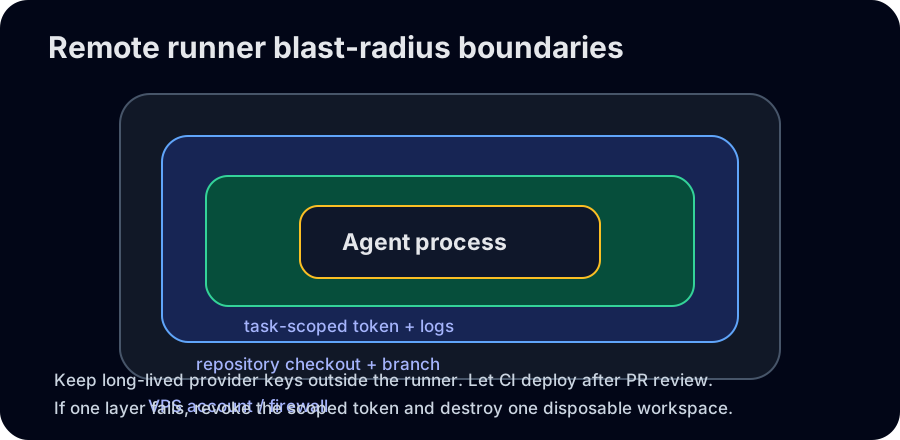
Do not put every token on every runner. For OpenClaw remote runner architecture, the safest default is:
- Store long-lived provider keys on the operator machine or a controlled secret store.
- Give each runner only the repo and branch it needs.
- Prefer short-lived GitHub tokens and revoke them when the task ends.
- Route deployments through CI instead of giving the runner production credentials.
- Stream logs back to the operator so stuck or suspicious work is visible.
- Delete the runner or worktree after merge, failure, or credential exposure.
That boundary is why Office Claws for OpenClaw users focuses on desktop management, VPS runner provisioning, log visibility, and safer local key handling rather than pretending every agent should share one permanent server account.
Sizing and Cost Rules of Thumb
Start small. Most coding-agent tasks need reliable disk, network, and RAM more than huge CPU. Use bigger runners only for monorepos, builds, test suites, or browser-heavy tasks.
| Workload | Suggested runner | Notes |
|---|---|---|
| docs, scripts, small fixes | 2 vCPU / 4 GB RAM | cheapest durable baseline |
| web app with tests | 4 vCPU / 8 GB RAM | good default for PR work |
| browser/E2E tasks | 4-8 vCPU / 16 GB RAM | isolate flaky browser dependencies |
| large monorepo build | dedicated runner | cache dependencies, limit concurrency |
Cost control comes from queueing and teardown, not just cheaper instances. Run enough runners to keep work moving, cap concurrency per repository, and archive logs before deleting machines.
Operational Checklist
Before giving an agent a remote runner, confirm:
- The task has a branch name, repository, and expected output.
- The runner starts from a clean image or clean worktree.
- Credentials are scoped, short-lived, and recorded for rotation.
- Logs, exit state, and generated diffs are visible from the control plane.
- CI is the only path to deploy or publish.
- A human review gate exists before merge.
If you need the broader security model, pair this article with OpenClaw security best practices and OpenClaw secrets management.
Where Office Claws Fits
Office Claws turns the architecture into an operator workflow: local desktop control, remote VPS runners, durable task tracking, logs, and Codex-backed execution for teams that need OpenClaw-style autonomy without losing review gates. It does not require treating the remote box as a trusted personal laptop.
Use the remote runner pattern when the work is long-running, parallel, risky, or needs a stable network location. Keep local-only work local. Keep production credentials in CI. Treat every runner as replaceable.
That is the practical promise of OpenClaw remote runner architecture: more autonomous work, less hidden terminal state, and a smaller blast radius when something goes wrong.
Related Reading
- OpenClaw vs Codex — compare runtime and operating models.
- Office Claws for OpenClaw users — local desktop control for VPS agent work.
- OpenClaw monitoring — status checks, logs, and stuck-runner recovery.